dshwiki-plugin
DSH Wiki 情报面板:在 dsh 侧边栏直接查看 DeepSeek Harness 插件精选、排行榜与大事记(数据来自 dshwiki.com)
ai798-lab
@ai798-lab
⬇ 1
★ 0
main
安装
dsh plugin --profile web add github:ai798-lab/dshwiki-plugin
需要可复现安装时,可在仓库后追加 #commit 固定提交。
DSH Wiki 情报面板:在 dsh 侧边栏直接查看 DeepSeek Harness 插件精选、排行榜与大事记(数据来自 dshwiki.com)
该插件未提供要点说明,请参考仓库 README。
deepseek-harnessdshdsh-pluginsidebar
- 安装并启动 DeepSeek Harness:
npx @deepseek-ai/dsh web - 在终端执行上面的安装命令(CLI 会解析插件并核验来源)
- 用 dsh plugins list 确认已安装,必要时重启 Harness 生效
插件以当前 dsh 进程的权限运行,安装时可能执行代码。请先通读仓库源码与许可证,确认无破坏性命令与越权访问;本站只做索引,不对第三方插件安全性作担保。
| 代码仓库 | github.com/ai798-lab/dshwiki-plugin |
| 许可证 | MIT |
| 主要语言 | main |
| 下载量 | 1 |
| GitHub 星标 | 0 |
| 最近推送 | 2026-08-18 |
| 收录日期 | 2026-09-19 |
| 分类 | 开发与运行时 |
事实信息来自公开插件目录快照(2026-10-01),介绍文案由本站再加工。
以下为插件仓库 README 全文(原始内容,由公开目录抓取整理)。
# DSH Wiki 在 dsh 侧边栏里放一个精选插件库:12 个值得装的 DeepSeek Harness 插件,安装命令一键复制,八种语言随时切换,不用离开工作界面。 数据来自 [dshwiki.com](https://dshwiki.com/),面板每次打开都拉最新的,站点更新了插件不用升级。 [English](#english) | 简体中文 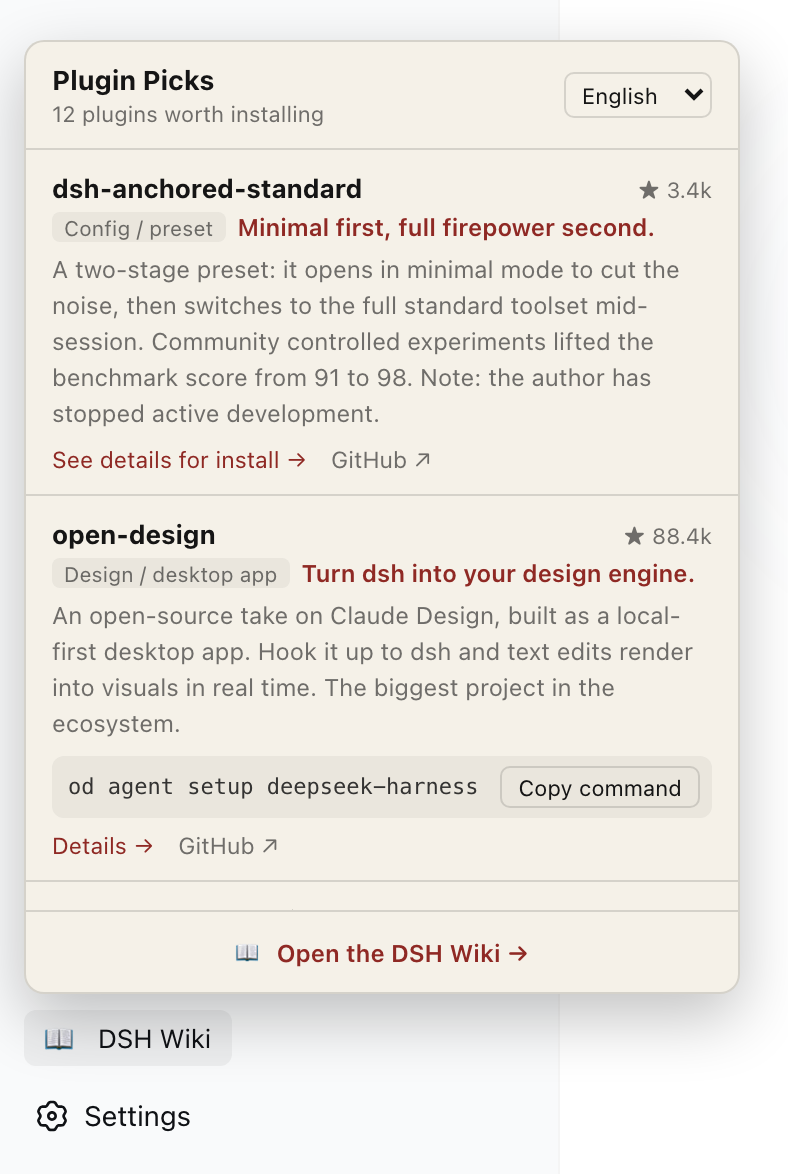 ## 安装 ```bash dsh plugin --profile web add dshwiki-plugin ``` 装完重启 `dsh web`,侧边栏底部会多一个 **DSH Wiki**,点开就是插件库。 也可以绕过 npm 直接从 GitHub 装: ```bash dsh plugin --profile web add github:ai798-Lab/dshwiki-plugin ``` 要求 dsh 的 web profile;开发者预览版 0.1.0-rc.7 上验证通过。 ## 面板里有什么 - **12 个精选插件**,逐个写清是什么、值不值得装、有什么坑 - **安装命令一键复制**,粘进终端就能跑;装法不止一行的会指向详情页 - **八种语言**(英 / 简中 / 繁中 / 日 / 韩 / 泰 / 西 / 阿),阿拉伯语走 RTL - 每条都跳得回 dshwiki.com 看完整资料,底部是知识库入口 面板配色跟随 dsh 的明暗主题。语言默认跟着 dsh 界面走,手动切换后记在本地。 ## 卸载 ```bash dsh plugin --profile web remove dshwiki-plugin ``` ## 已知问题 **装完报 `ERR_MODULE_NOT_FOUND`**:pnpm 11 会把发布不满十天的版本装成旧版。实测 `dsh plugin add` 会自动把本包写进 profile 的 `pnpm-workspace.yaml` 的 `minimumReleaseAgeExclude` 放行,一般不需要你动手;万一没有,手动补上即可: ```yaml minimumReleaseAgeExclude: - 'dshwiki-plugin' ``` **面板显示加载失败**:面板要联网取 dshwiki.com 的数据,离线时会显示失败并给出重试按钮。 dsh 目前是开发者预览版,官方明示接口会有破坏性变更。本插件跟着 dsh 版本维护。 ## 开发 没有构建步骤,源码即产物: ``` package.json # dsh.bundle 与 dsh.client 两处声明是关键 cordis.patch.yml # 把插件插入 profile 的插件树 lib/index.js # host 半边,纯 UI 插件留空即可 lib/client.js # 浏览器半边,用 react.createElement 手写 ``` 本地调试: ```bash dsh plugin --profile web add /本地路径/dshwiki-plugin dsh web ``` 改完代码重启 `dsh web` 即可,client.js 带版本哈希会自动失效缓存。 --- # DSH Wiki (English) A curated plugin directory inside your dsh sidebar: 12 DeepSeek Harness plugins worth installing, install commands one click away, eight languages, without leaving your workspace. Content is fetched live from [dshwiki.com](https://dshwiki.com/), so the panel stays current without updating the plugin. ## Install ```bash dsh plugin --profile web add dshwiki-plugin ``` Restart `dsh web`. A **DSH Wiki** entry appears at the bottom of the sidebar. Or straight from GitHub, bypassing npm: ```bash dsh plugin --profile web add github:ai798-Lab/dshwiki-plugin ``` Requires the dsh web profile; verified against developer preview 0.1.0-rc.7. ## What's inside - **Twelve handpicked plugins**, each with what it does, whether it is worth installing, and the gotchas - **Install commands copy in one click**; plugins that need more than one line link to their page - **Eight languages** (English / Simplified & Traditional Chinese / Japanese / Korean / Thai / Spanish / Arabic, with RTL) - Every entry links back to dshwiki.com, and the footer opens the wiki The panel follows the host's light/dark theme. Language follows the dsh UI by default; a manual choice is remembered locally. ## Uninstall ```bash dsh plugin --profile web remove dshwiki-plugin ``` ## Known issues **`ERR_MODULE_NOT_FOUND` after install**: pnpm 11 holds back releases younger than ten days. In practice `dsh plugin add` adds this package to `minimumReleaseAgeExclude` in the profile's `pnpm-workspace.yaml` for you; if it doesn't, add it by hand: ```yaml minimumReleaseAgeExclude: - 'dshwiki-plugin' ``` **Panel fails to load**: the panel fetches dshwiki.com; offline it shows the error with a retry button. dsh is a developer preview and the team states breaking changes will happen. This plugin tracks dsh releases. ## License MIT © ai798 Lab
数据来源:公开的 DeepSeek Harness 插件目录与各插件 GitHub 仓库。本站为独立第三方目录,与 DeepSeek、幻方(High-Flyer)及插件作者均无隶属或背书关系。

