dsh-mnemon
DeepSeek Harness 的三层记忆控制平面:持久运行时上下文、可搜索项目文档、可插拔长期记忆、智能路由、受监督的 agent 工作流、WebUI 与无头工具。
grivn
@grivn
⬇ 1
★ 163
main
安装
dsh plugin --profile web add github:grivn/dsh-mnemon
需要可复现安装时,可在仓库后追加 #commit 固定提交。
DeepSeek Harness 的三层记忆控制平面:持久运行时上下文、可搜索项目文档、可插拔长期记忆、智能路由、受监督的 agent 工作流、WebUI 与无头工具。
该插件未提供要点说明,请参考仓库 README。
agent-memorydeepseek-harnesslocal-firstpersistent-memorydsh-plugindocument-search
- 安装并启动 DeepSeek Harness:
npx @deepseek-ai/dsh web - 在终端执行上面的安装命令(CLI 会解析插件并核验来源)
- 用 dsh plugins list 确认已安装,必要时重启 Harness 生效
插件以当前 dsh 进程的权限运行,安装时可能执行代码。请先通读仓库源码与许可证,确认无破坏性命令与越权访问;本站只做索引,不对第三方插件安全性作担保。
| 代码仓库 | github.com/grivn/dsh-mnemon |
| 许可证 | MIT |
| 主要语言 | main |
| 下载量 | 1 |
| GitHub 星标 | 163 |
| 最近推送 | 2026-08-21 |
| 收录日期 | 2026-09-19 |
| 分类 | 会话与消息 |
事实信息来自公开插件目录快照(2026-10-01),介绍文案由本站再加工。
以下为插件仓库 README 全文(原始内容,由公开目录抓取整理)。
dsh-mnemon
English · 简体中文
[图片: release v0.2.15]
[图片: three memory tiers]
[图片: nine providers]
[图片: Node.js 20 or newer]
[图片: MIT license]
The three-tier, pluggable, Agent-driven memory system for DeepSeek Harness.
Three memory tiers · Nine long-term providers · One supervised workflow
[图片: dsh-mnemon v0.2.0 live multi-memory snapshot and observable provider surfaces]
Explore the capability map ·
Start in five minutes ·
Read the v0.2.15 notes ·
Watch the widescreen demo
`dsh-mnemon` gives DSH one memory control plane without forcing every kind of knowledge into one database. Runtime Memory keeps compact context available every turn. Project Documents preserve complete narratives. Memory Spaces retrieve durable evidence on demand and can use **Mnemon, OpenViking, Honcho, Mem0, Hindsight, Holographic, RetainDB, ByteRover, or Supermemory**.
[Mnemon](https://github.com/mnemon-dev/mnemon) remains the official, prioritized native engine. The third tier is replaceable; the first two keep the same storage, workspace, and interaction model regardless of provider.
## Understand the scope in 30 seconds
| Tier | Keep here | How it reaches the Agent | Managed by |
|---|---|---|---|
| **Runtime** | Preferences, collaboration rules, project conventions, environment facts | Compact `USER.md` / `MEMORY.md` projection on every turn | Deterministic dsh-mnemon Host |
| **Documents** | Designs, investigations, procedures, postmortems, handoffs | Search first, full Markdown on demand | Deterministic dsh-mnemon Host |
| **Memory Spaces** | Cross-session facts, decisions, entities, relations | Bounded recall from active spaces | Mnemon Native or an external Provider |
The tiers are not copies. A useful rule is: **every-turn context goes to Runtime, complete narratives go to Documents, and cross-task evidence goes to Memory Spaces.** Current instructions, repository files, and live tool results always outrank historical memory.
## Clicks that start real work
| User action | What actually runs | Data effect |
|---|---|---|
| **Search** | Concurrent provider-native recall | Read-only |
| **Agent query** | A clean top-level task Agent receives bounded evidence and writes an answer | Read-only |
| **Remember** / **Save to memory** | A clean task Agent qualifies, routes, deduplicates, distills, and writes behind Host controls | Writes only if accepted |
| **Smart selection** | Hard rules filter providers; a task Agent resolves only genuine ambiguity | Saves a routing receipt |
| **AI metadata** | One asynchronous task Agent per selected Memory Space, each using the provider's fastest sample path | Local title/description only |
| **Archive Document** | A task Agent creates a searchable cold reference before the Host moves the original | Supervised move |
| **Turn memory** | Expands exact recall, write, and Document-search activity; each item navigates to its source | Read-only |
These tasks do not reuse or consume the main conversation history. By default they follow DSH's new-session model route; **Settings → Memory System → Background task Agent** can select a dedicated Provider and model. That fixed route applies to every Mnemon subagent delegation (idle checkpoint review, recall, write, answer, provider placement, memory migration, USER compaction, document archive, and metadata maintenance). With DSH 0.1.1-rc.2, the first-party `deepseek-official/deepseek-v4-flash-vision-exp` route appears with an **Image input** label. Mnemon background jobs still send text-only prompts; multimodal conversation messages keep their DSH attachment references through lifecycle processing, and raw image bytes are never copied into memory.
## One Memory Space workflow, nine providers
| Provider | Shape | Best fit |
|---|---|---|
| **[Mnemon](https://github.com/mnemon-dev/mnemon)** | Official native local CLI + SQLite | Exact writes, entities, typed relationships, local-first sharing |
| **[OpenViking](https://github.com/volcengine/OpenViking)** | HTTP + `viking://` | Resource trees and asynchronous extraction |
| **[Honcho](https://github.com/plastic-labs/honcho)** | HTTP workspace / peers | Team and Agent-peer conclusions |
| **[Mem0](https://github.com/mem0ai/mem0)** | Platform or self-hosted HTTP | Existing user / Agent memory |
| **[Hindsight](https://github.com/vectorize-io/hindsight)** | HTTP memory bank | Banks, entities, provider-native graph |
| **[Holographic](https://github.com/NousResearch/hermes-agent/tree/main/plugins/memory/holographic)** | Local structured fact files | Auditable facts, trust scores, local entities |
| **[RetainDB](https://github.com/RetainDB/RetainDB)** | HTTP project / user | Project- and user-scoped profiles |
| **[ByteRover](https://github.com/campfirein/byterover-cli)** | Local `brv` CLI | Code knowledge trees and curate workflows |
| **[Supermemory](https://github.com/supermemoryai/supermemory)** | HTTP container | Document ingestion and container sharing |
Provider capability differences stay visible. dsh-mnemon never invents graph edges, deletion semantics, or enumerable content for an engine that does not provide them. **Settings owns reusable Provider services; Memory Spaces owns concrete instances, activation, scope, and metadata.** External Providers are off by default.
See the [provider capability and deployment matrix](./docs/en/memory-providers.md).
## Real WebUI walkthrough
The following roughly 55-second capture comes from a live 1600×900 DSH WebUI. It deliberately pauses on full-page scrolling, page transitions, Provider cards, dialogs, button-state changes, and a completed read-only Agent Query. Destructive confirmations are deliberately not submitted.

[Watch the 1600×900 MP4](https://github.com/omdsh-dev/dsh-mnemon/blob/e6ca446e45bdd17991f3c7c98560456de465282b/docs/assets/media/dsh-mnemon-memory-system-demo.mp4) · [Open the page-by-page UI guide](./docs/en/ui-guide.md)
## Start in five minutes
### 1. Install Mnemon Native
Mnemon is the default engine and the simplest local-first starting point:
```sh
# macOS
brew install --cask mnemon-dev/tap/mnemon
# macOS / Linux via Go
go install github.com/mnemon-dev/mnemon@latest
mnemon --version
```
Windows users can install the official v0.2.3-or-newer release ZIP. The expected installation path and checksum procedure are in [Getting Started](./docs/en/getting-started.md#2-install-mnemon).
### 2. Install DSH and the plugin
This release is verified against DSH 0.1.1-rc.2, whose complete profiles require Node.js `^22.19.0 || >=24.0.0`; Node 20 lacks host primitives used by rc.2. The dsh-mnemon package itself retains Node.js 20 compatibility for older compatible DSH hosts. DSH rc.2 is published on npm's `latest` and `next` tags; use the exact version below for a reproducible installation:
```sh
npm install -g @deepseek-ai/dsh@0.1.1-rc.2
dsh --version
```
```sh
dsh plugin --profile web add dsh-mnemon
dsh --profile web
```
DSH profiles have independent plugin rosters. Install the same package separately for one-shot Headless tasks:
```sh
dsh plugin --profile headless add dsh-mnemon
dsh --profile headless "Check durable project context before answering this task."
```
For a local checkout, use an absolute path:
```sh
dsh plugin --profile web add "link:/absolute/path/to/dsh-mnemon"
dsh plugin --profile headless add "link:/absolute/path/to/dsh-mnemon"
```
### 3. Verify the first workflow
1. Open **Memory System → Status** and verify dsh-mnemon, Mnemon Native, Runtime, Documents, and enabled Providers.
2. Open **Memory Spaces → Overview → Create Memory Space** and choose an enabled Provider explicitly.
3. Submit one stable, future-useful candidate through **Remember**.
4. Open **Recall**, run a direct search, then run **Agent query** against the same question.
5. Return to the conversation, expand **Turn memory**, and follow one exact tool link.
The primary tab order is intentionally stable: **Status, Runtime, Documents, Memory Spaces**.
## Familiar controls, expanded capability
### Agent-driven memory operations
| Supervised distillation | Bounded Agent query |
|---|---|
| [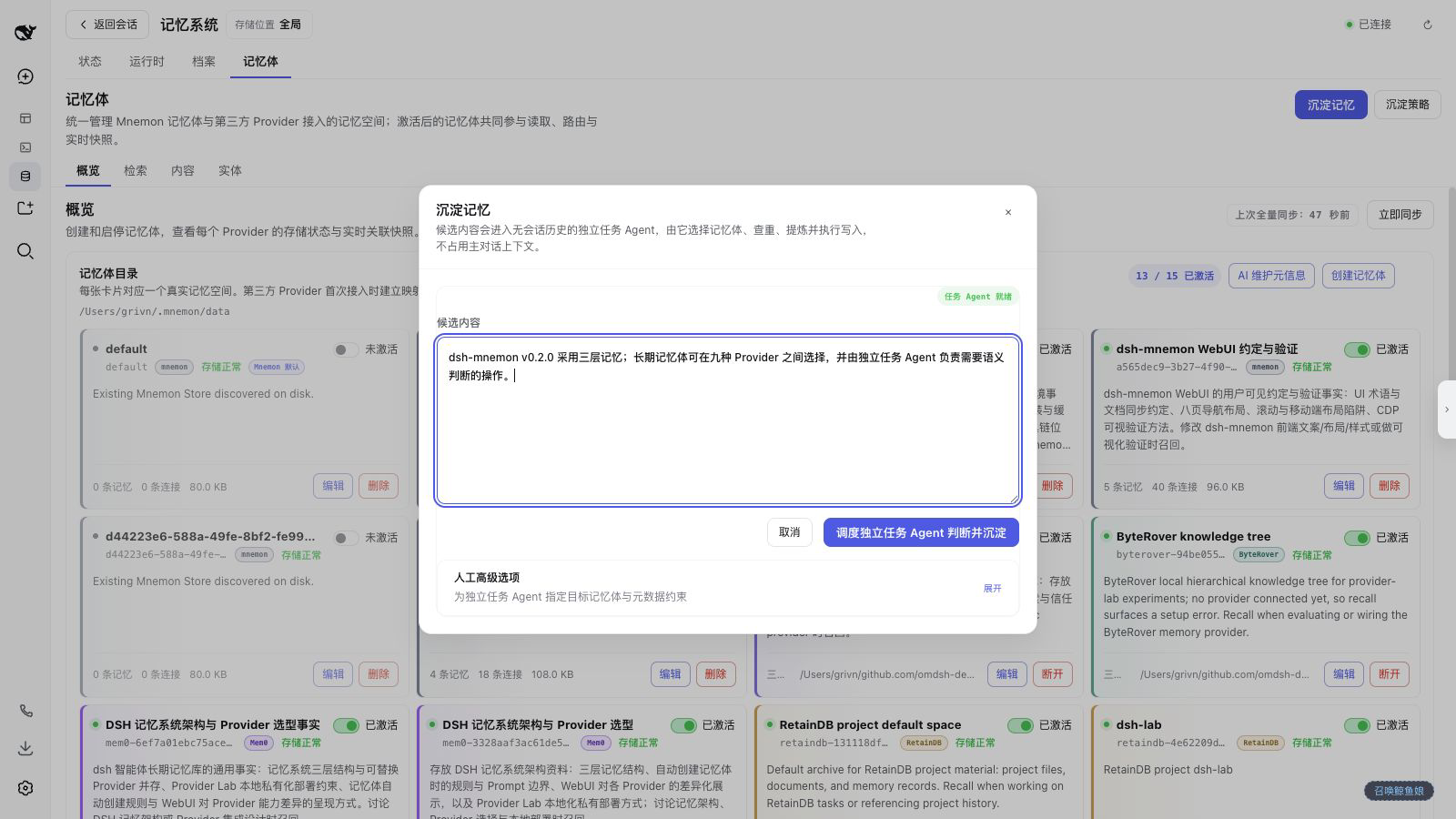](https://github.com/omdsh-dev/dsh-mnemon/blob/e6ca446e45bdd17991f3c7c98560456de465282b/docs/assets/screenshots/remember-dialog.png) | [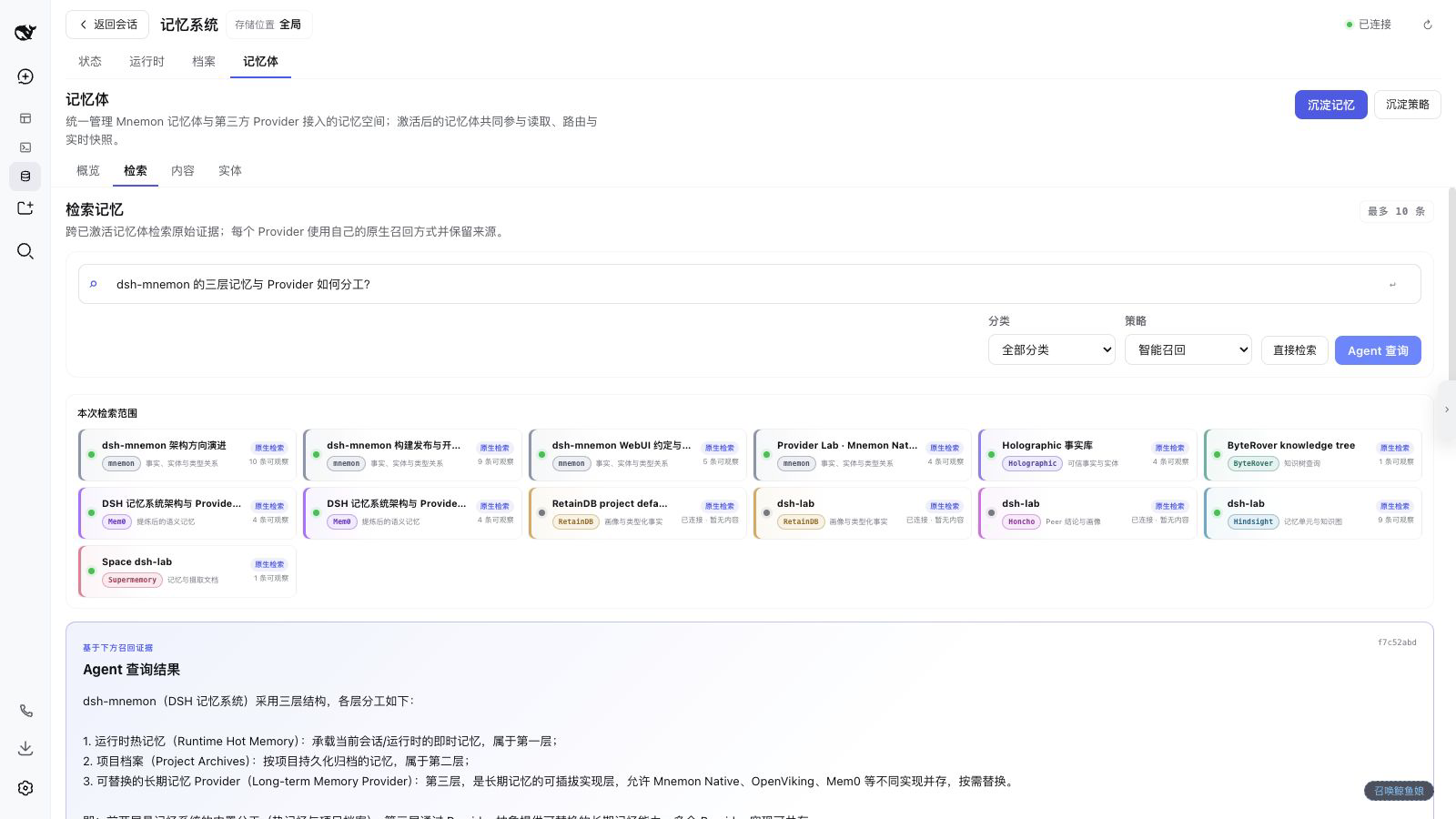](https://github.com/omdsh-dev/dsh-mnemon/blob/e6ca446e45bdd17991f3c7c98560456de465282b/docs/assets/screenshots/recall-agent-answer.png) |
The workbench makes the task boundary explicit before dispatch and keeps the returned answer beside its evidence scope. Conversation-native Turn memory and Save to memory remain enabled by default and can be changed independently under **Settings → Memory System → Conversation interface**.
### Manual or policy-driven placement
| Create explicitly | Route future distillation intelligently |
|---|---|
| [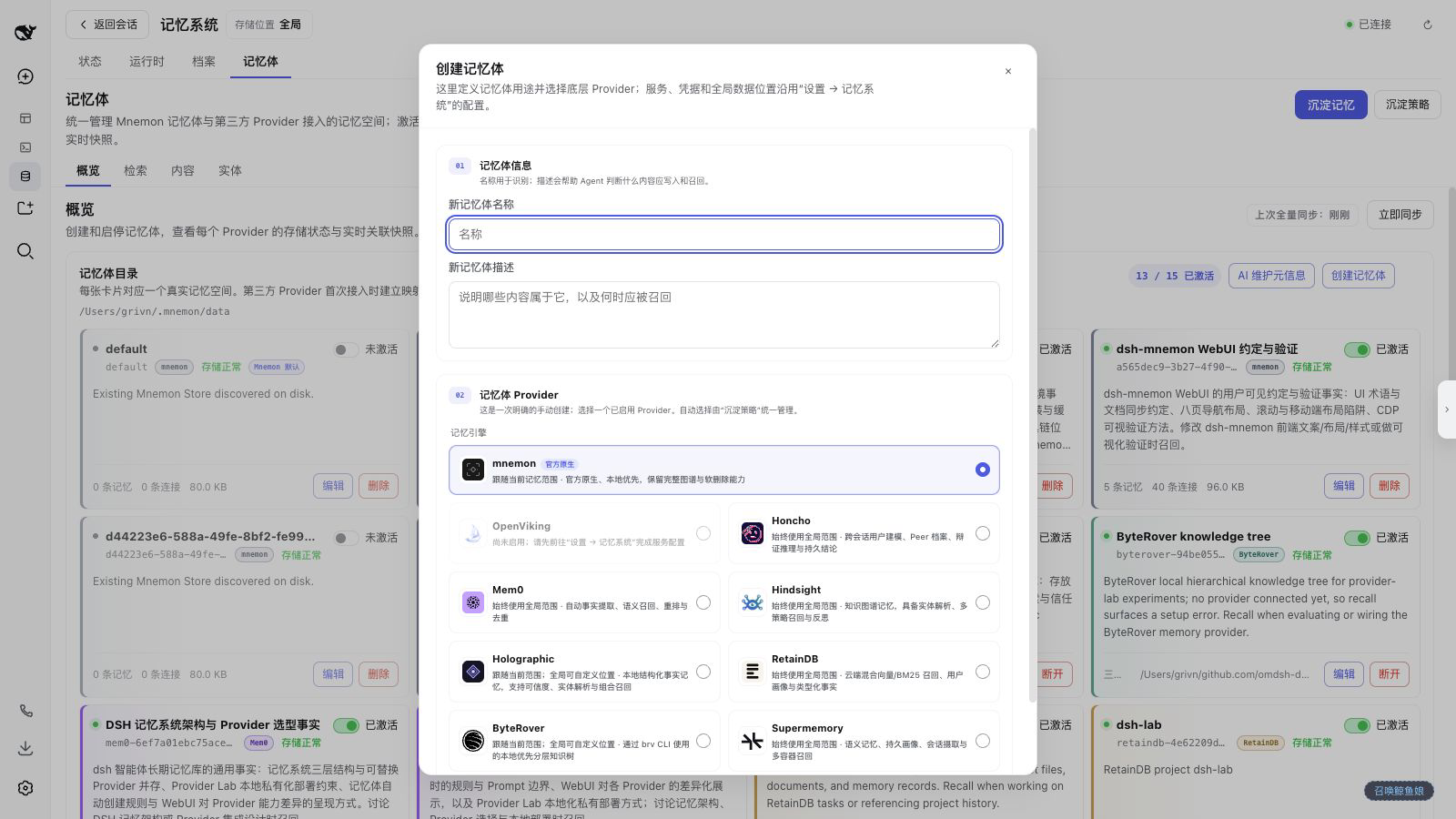](https://github.com/omdsh-dev/dsh-mnemon/blob/e6ca446e45bdd17991f3c7c98560456de465282b/docs/assets/screenshots/memory-space-create-dialog.png) | [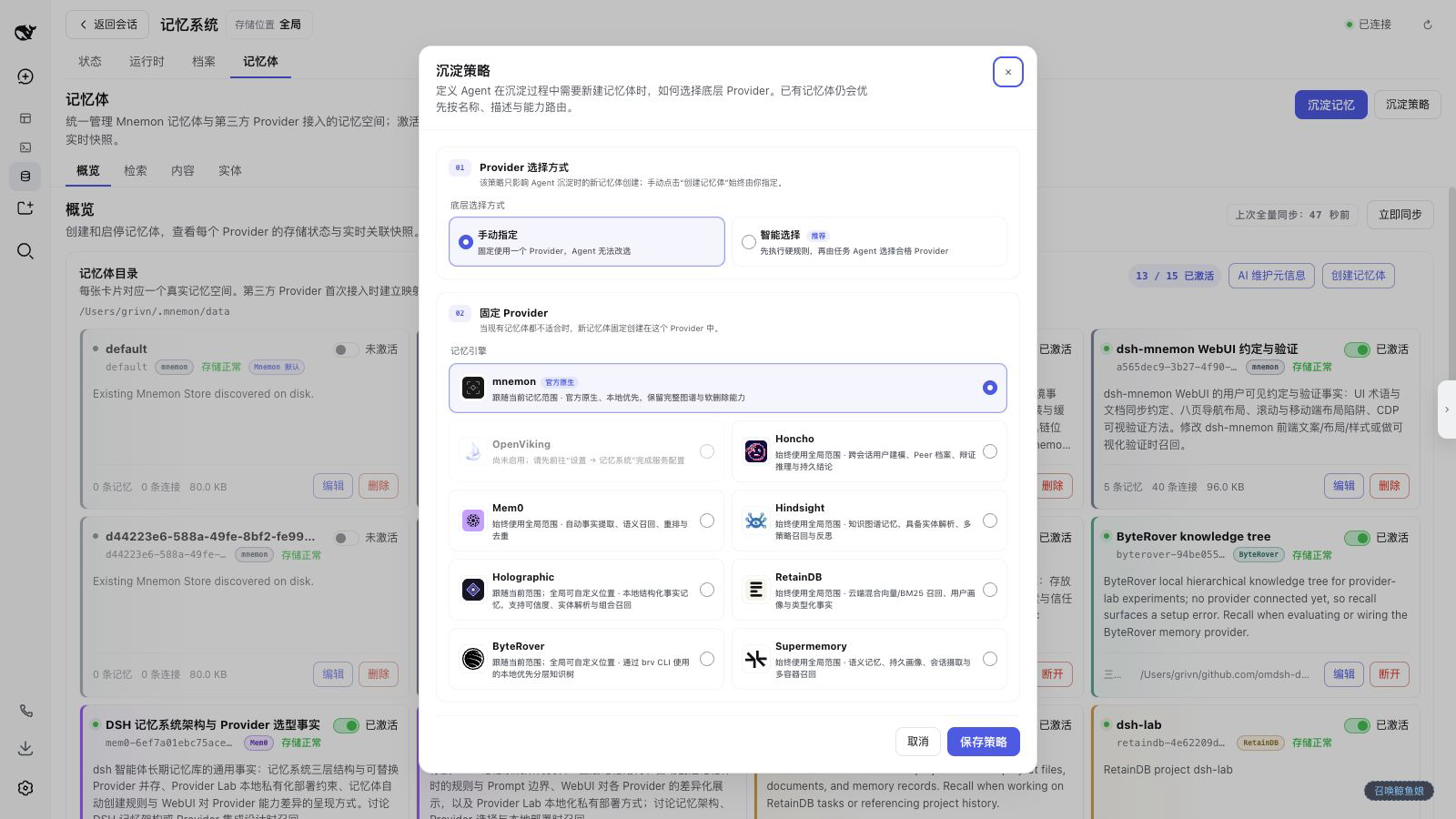](https://github.com/omdsh-dev/dsh-mnemon/blob/e6ca446e45bdd17991f3c7c98560456de465282b/docs/assets/screenshots/distillation-strategy.png) |
Manual creation always asks the user to choose. Smart selection is a distillation policy: hard rules define the eligible set, then an optional prompt guides the Agent only when several candidates remain.
## Global, workspace, and custom scope
| Scope | Behavior |
|---|---|
| `global` | Uses `~/.mnemon`; ideal for a local control plane shared across workspaces and Agents |
| `workspace` | Uses `/.mnemon`; local Providers that support workspace following move with the effective workspace |
| `custom` | An explicit path with global semantics, useful for team conventions or isolated environments |
Remote Provider workspaces, users, banks, projects, containers, and URIs remain their own namespaces; switching the DSH workspace never silently rewrites them. In workspace mode, the workbench may inspect one selected workspace while the current conversation continues to execute in its own cwd. Independent task Agents launched from the workbench use the inspected workspace even when no main session is selected.
## Web, conversation, and Headless share one system
| Surface | What remains available |
|---|---|
| **Sidebar WebUI** | Status, Runtime, Documents, Memory Spaces, Provider services, visualization, and confirmation surfaces |
| **Conversation UI** | Turn memory, Save to memory, exact navigation to the corresponding page |
| **Headless** | Runtime injection, Document search, Memory Space tools, workspace routing, and supervised writes without a WebUI |
| **Commands** | `/mnemon status`, `recall`, `related`, `remember`, and `forget` |
## Data and security boundaries
- Runtime and Documents are local deterministic stores. Mnemon Native is local by default; external Providers are explicit opt-ins.
- Provider credentials are mode `0600` under `/state/memory-providers.json`. They are never returned to the browser, smart-selection Agent, or Mnemon Pack.
- Host calls use argument arrays with shell disabled, bounded output, timeouts, cancellation, schema validation, path boundaries, locks, and revisions.
- Disabling a Provider clears its local catalog metadata but never deletes remote data. Reconnecting rebuilds metadata from the Provider, using local defaults only when a field cannot be mapped.
- Changing scope never migrates, merges, or deletes an old root automatically.
- There is no deterministic secret scanner yet. Never store keys, tokens, private keys, or raw sensitive logs in any tier.
- Uninstalling the plugin does not remove local or remote memory data.
See [Operations, security, and troubleshooting](./docs/en/operations.md) for backup, recovery, and diagnostics.
## Documentation
| I want to… | Start here |
|---|---|
| See the complete product boundary | [Capability map](./docs/en/capabilities.md) |
| Install and verify the first workflow | [Getting Started](./docs/en/getting-started.md) |
| Follow every visible click and Agent action | [Sidebar and conversation UI guide](./docs/en/ui-guide.md) |
| Compare or deploy all nine Providers | [Long-term memory providers](./docs/en/memory-providers.md) |
| Understand tiering and lifecycle | [Storage model](./docs/en/storage-model.md) · [Workflows](./docs/en/workflows.md) |
| Configure scope, routing, and model selection | [Configuration](./docs/en/configuration.md) |
| Back up, update, or troubleshoot | [Operations](./docs/en/operations.md) |
| Integrate tools, commands, or RPC | [Interface reference](./docs/en/interfaces.md) |
| Review the release | [v0.2.15 release notes](./docs/en/releases/v0.2.15.md) |
See the [documentation hub](./docs/en/README.md) for the full map.
## Development
```sh
pnpm install
pnpm run verify
```
`verify` runs TypeScript checks, Vitest, a reproducible double build, an isolated real Headless-profile activation check, and published-package validation. `lib/` is generated and intentionally not tracked.
Before opening an Issue or Pull Request, read the [contribution rules](./CONTRIBUTING.md) ([简体中文](./CONTRIBUTING.zh-CN.md)) and use the bilingual repository templates. Incomplete reports and PR descriptions are rejected by bilingual automated policy checks.
## License
MIT. Report security issues privately through [SECURITY.md](./SECURITY.md), not a public issue.
数据来源:公开的 DeepSeek Harness 插件目录与各插件 GitHub 仓库。本站为独立第三方目录,与 DeepSeek、幻方(High-Flyer)及插件作者均无隶属或背书关系。

