dsh-skin-claude-code
受 Claude Code 启发的 DeepSeek Harness Web GUI 皮肤:暖炭灰/暖奶油色表面、陶土色点缀、等宽终端字体,自动适配明暗主题
lucasn0820
@lucasn0820
⬇ 1
★ 2
main
安装
dsh plugin --profile web add github:lucasn0820/dsh-skin-claude-code
需要可复现安装时,可在仓库后追加 #commit 固定提交。
受 Claude Code 启发的 DeepSeek Harness Web GUI 皮肤:暖炭灰/暖奶油色表面、陶土色点缀、等宽终端字体,自动适配明暗主题
该插件未提供要点说明,请参考仓库 README。
deepseek-harnessdeepseek-harness-plugindeepseek-harness-plugin-devdeepseek-harness-plugins
- 安装并启动 DeepSeek Harness:
npx @deepseek-ai/dsh web - 在终端执行上面的安装命令(CLI 会解析插件并核验来源)
- 用 dsh plugins list 确认已安装,必要时重启 Harness 生效
插件以当前 dsh 进程的权限运行,安装时可能执行代码。请先通读仓库源码与许可证,确认无破坏性命令与越权访问;本站只做索引,不对第三方插件安全性作担保。
| 代码仓库 | github.com/lucasn0820/dsh-skin-claude-code |
| 许可证 | MIT |
| 主要语言 | main |
| 下载量 | 1 |
| GitHub 星标 | 2 |
| 最近推送 | 2026-08-14 |
| 收录日期 | 2026-09-19 |
| 分类 | 界面增强 |
事实信息来自公开插件目录快照(2026-10-01),介绍文案由本站再加工。
以下为插件仓库 README 全文(原始内容,由公开目录抓取整理)。
# dsh-skin-claude-code
English | [中文](README.zh.md)
A **Claude Code–inspired skin** for the [DeepSeek Harness](https://github.com/deepseek-ai/deepseek-harness) web GUI.
It restyles the browser surface with Claude Code's signature look:
- **Warm charcoal / warm cream** surfaces instead of the stock cool grays
- **Terracotta accent** (`#D97757`) for brand, focus, caret, links, and scrollbars
- **Monospace terminal typography** (JetBrains Mono / ui-monospace fallback)
- Warm-tinted code blocks and `code`/`pre` surfaces
The skin stacks a token-override layer over whatever theme is active, so it
adapts automatically to **light**, **dark**, and **system** preferences.
## Preview
| Dark | Light |
| --- | --- |
| 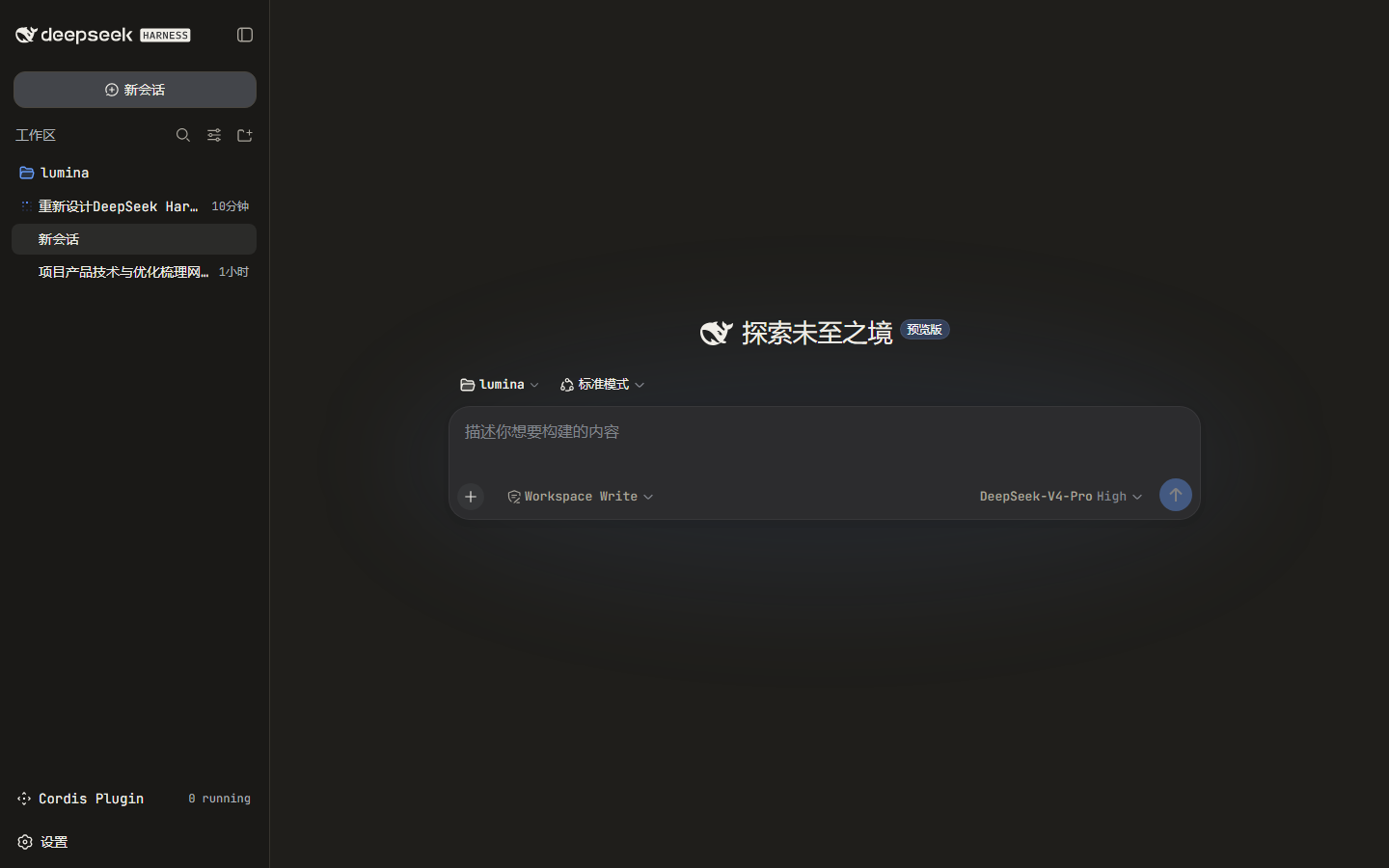 | 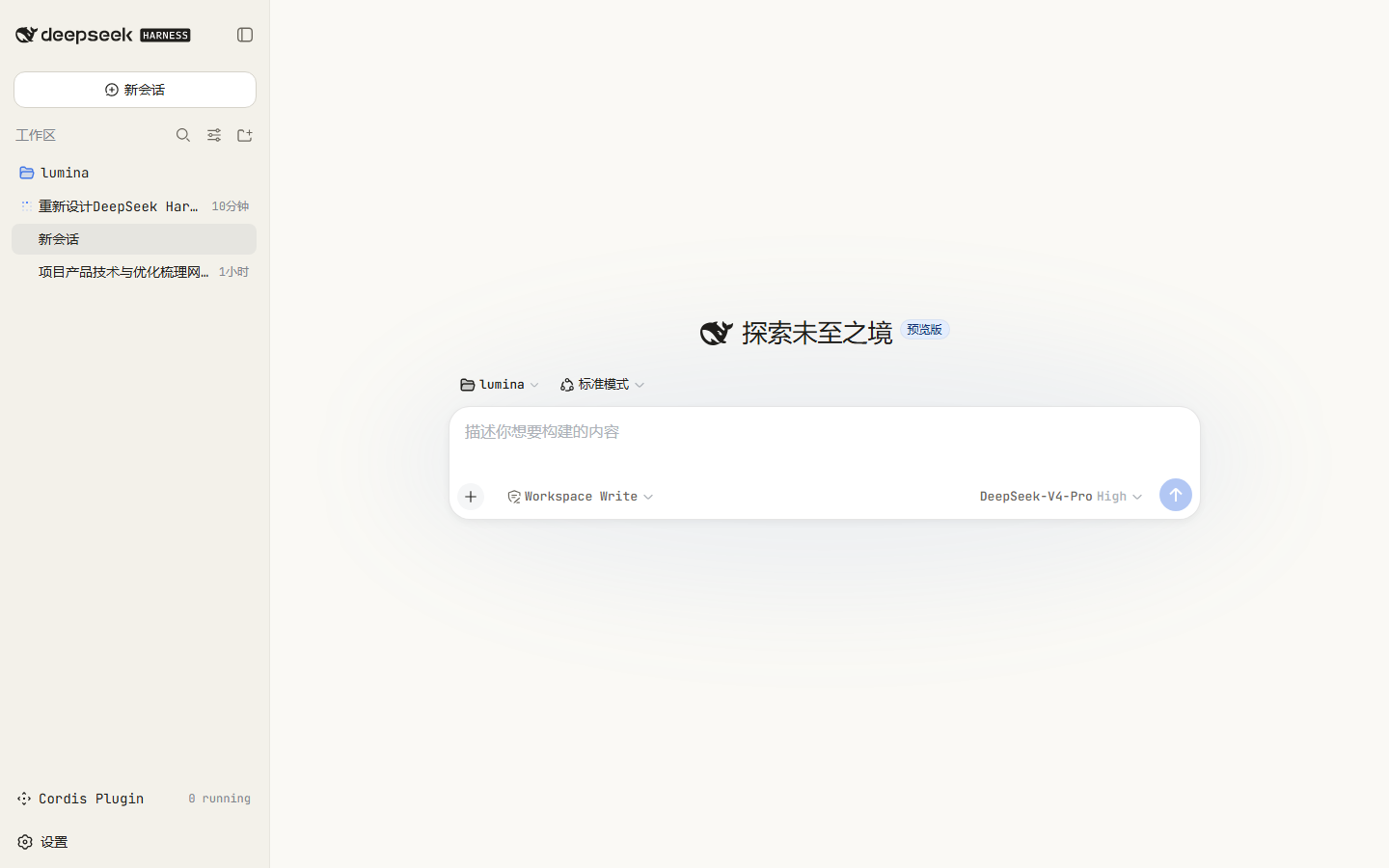 |
---
## Install
The package is a DSH **bundle**: its `package.json` declares `dsh.bundle.patch`,
so `dsh plugin add` installs it **and** auto-registers it as a profile layer.
No `cordis.patch.yml` editing is required.
```sh
dsh plugin --profile web add dsh-skin-claude-code
dsh web
```
To target a different profile, change `--profile`. A convenience wrapper also
ships in the repo:
```sh
./install.sh # optional profile name, defaults to "web"
```
### Why no manual patch edit
`dsh plugin add` forwards to pnpm inside the profile, then reconciles the
profile's `dsh.profile.bundles` list: a dependency whose `package.json`
declares `dsh.bundle.patch` is appended to that list automatically. On boot,
the loader applies each bundle's own `cordis.patch.yml` (which inserts the
skin's row), so the plugin mounts with no manual composition edits.
---
## Uninstall
```sh
dsh plugin --profile web remove dsh-skin-claude-code
dsh web
```
---
## How it works
- `package.json` declares two things:
- `dsh.bundle.patch` → `cordis.patch.yml`, which inserts the plugin row;
- `dsh.client` (`platform: web`, `inject` on `@deepseek-ai/dsh-client-ui-theme`),
which serves the browser half.
- `lib/index.js` is the no-op host half (client-only plugins still export a
host entry so the composition loader can resolve the row).
- `lib/client.js` registers with `window.__ModuleLoader__`, then on activation:
- calls `ctx.theme.overrideTokens("dsh-skin-claude-code", TOKENS)` — a
reversible token layer over the active theme, with light/dark values;
- injects a `
数据来源:公开的 DeepSeek Harness 插件目录与各插件 GitHub 仓库。本站为独立第三方目录,与 DeepSeek、幻方(High-Flyer)及插件作者均无隶属或背书关系。

