dsh-dock
DSH Web 插件的工程级停靠系统:左右底与浮动面板、标签组、键盘缩放、拖拽与边沿吸附预览。
mattismegevand
@mattismegevand
⬇ 1
★ 1
main
安装
dsh plugin --profile web add github:mattismegevand/dsh-dock
需要可复现安装时,可在仓库后追加 #commit 固定提交。
DSH Web 插件的工程级停靠系统:左右底与浮动面板、标签组、键盘缩放、拖拽与边沿吸附预览。
该插件未提供要点说明,请参考仓库 README。
cordisdeepseek-harnessdockdshdsh-pluginlayout
- 安装并启动 DeepSeek Harness:
npx @deepseek-ai/dsh web - 在终端执行上面的安装命令(CLI 会解析插件并核验来源)
- 用 dsh plugins list 确认已安装,必要时重启 Harness 生效
插件以当前 dsh 进程的权限运行,安装时可能执行代码。请先通读仓库源码与许可证,确认无破坏性命令与越权访问;本站只做索引,不对第三方插件安全性作担保。
| 代码仓库 | github.com/mattismegevand/dsh-dock |
| 许可证 | MIT |
| 主要语言 | main |
| 下载量 | 1 |
| GitHub 星标 | 1 |
| 最近推送 | 2026-08-16 |
| 收录日期 | 2026-09-19 |
| 分类 | 界面增强 |
事实信息来自公开插件目录快照(2026-10-03),介绍文案由本站再加工。
以下为插件仓库 README 全文(原始内容,由公开目录抓取整理)。
# dsh-dock
English | [中文](README.zh.md)
> A plugin-owned docking system for the DeepSeek Harness Web UI. It gives browser plugins a stable keyed panel slot and `ctx.dock` service without modifying the Harness repository.
[](LICENSE)
[](https://github.com/topics/dsh-plugin)
## What it does
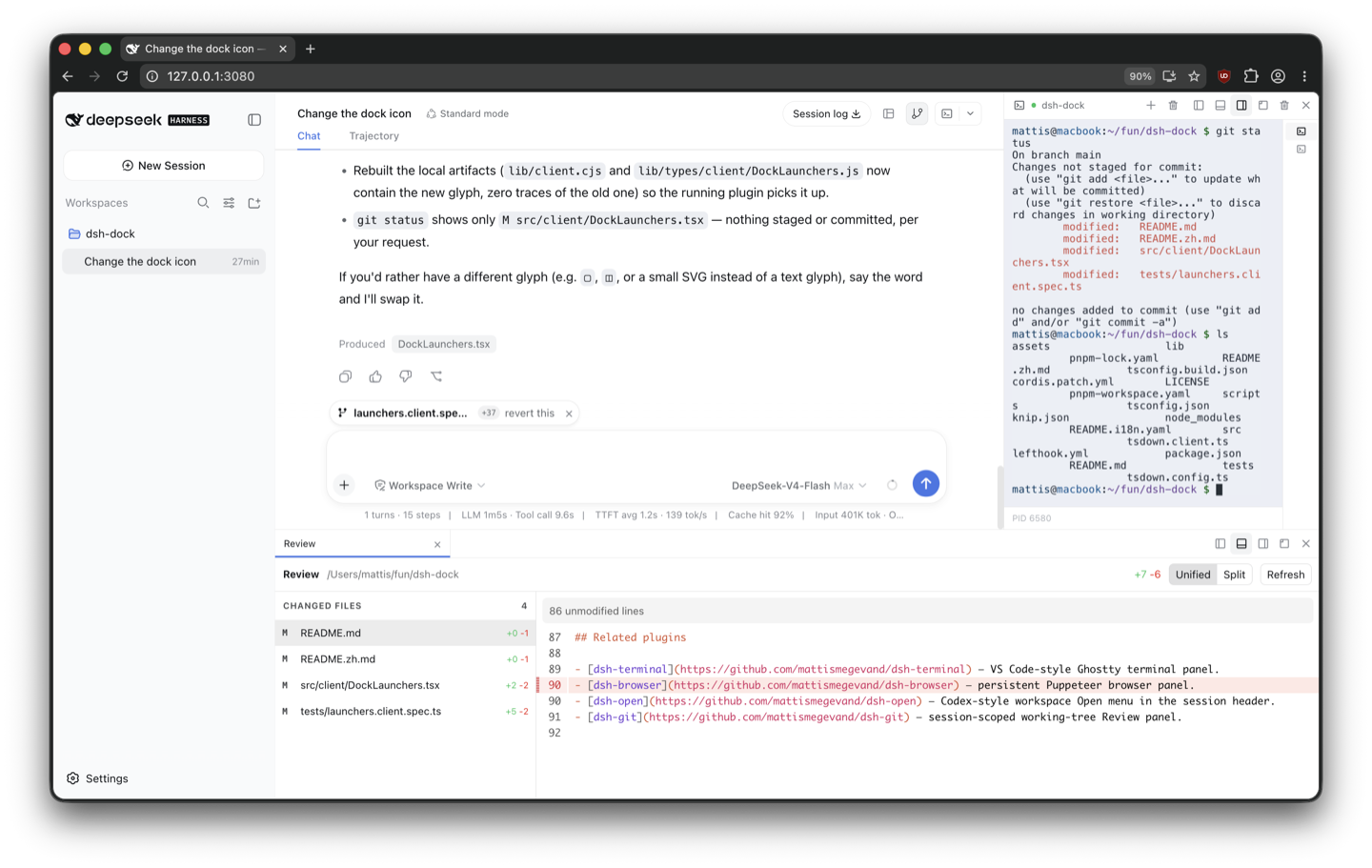
- Left, right, bottom, and floating panel placement with tab groups.
- Pointer and keyboard resizing, header dragging, edge previews, and `Alt+Shift+Arrow` docking.
- Lazy child detachment with rollback on cancelled drags.
- Per-session, versioned `localStorage` layouts with bounded scope retention.
- Responsive side-panel folding below the configured compact breakpoint.
- Stable mounts while panels move, hide, or switch tabs.
- Session-header launchers and logical launcher groups for multi-pane features.
## Panel API
Register metadata with `ctx.dock`, then contribute content to the keyed `dock.panel` slot with the same id:
```ts
const disposePanel = ctx.dock.registerPanel({
id: 'terminal',
title: 'Terminal',
icon: '>_',
defaultLocation: 'bottom',
})
ctx.slots.inject('dock.panel', () => ctx.slots.register({
name: 'dock.panel',
key: 'terminal',
}, TerminalPanel))
```
Panel components receive `panelId`, `visible`, `location`, `closePanel`, `activatePanel`, `setPanelTitle`, and `beginPanelDrag`. Hidden panels remain mounted. A child drag can return a new `panelId` and `rollback`; the dock invokes rollback on cancellation or disposal.
## Harness compatibility
The plugin uses `shell.overlay`, `conversation.session.header.utilities`, and `conversation.input.right`. Its reversible frame adapter discovers the semantic sidebar, conversation, and details anchors, inserts grid spacers, and restores changed inline styles during disposal.
## Install
Requires the [`dsh`](https://www.npmjs.com/package/@deepseek-ai/dsh) CLI (Node.js 22.19+ or 24) and pnpm 10+.
### From npm
```sh
dsh plugin --profile web add @mattismegevand/dsh-dock
```
### From GitHub
```sh
dsh plugin --profile web add github:mattismegevand/dsh-dock
```
Git installs fetch sources, so pnpm runs the package's `prepare` build on first add. pnpm ≥10 refuses that until you allow it: copy the exact package key pnpm printed into the profile's `pnpm-workspace.yaml` `allowBuilds` entry, then re-run the same `add`.
### Develop locally
```sh
git clone https://github.com/mattismegevand/dsh-dock.git
cd dsh-dock
corepack pnpm install
corepack pnpm check:all
dsh plugin --profile web add .
```
## Configuration
All deployment-varying dimensions and thresholds are validated Loader config, including the compact breakpoint, drag threshold, persistence bound, default dock sizes, minimum sizes, and floating bounds.
```yaml
- id: dock
name: '@mattismegevand/dsh-dock'
config:
compactBreakpoint: 860
maxPersistedScopes: 64
defaultBottomSize: 340
```
## Related plugins
- [dsh-terminal](https://github.com/mattismegevand/dsh-terminal) — VS Code-style Ghostty terminal panel.
- [dsh-open](https://github.com/mattismegevand/dsh-open) — Codex-style workspace Open menu in the session header.
- [dsh-git](https://github.com/mattismegevand/dsh-git) — session-scoped working-tree Review panel.
## Model experience
### Dock UI contribution
#### What the model sees
Nothing. The plugin only registers browser layout, chrome, persistence, and a client service; it adds no prompt, tool schema, message, or model-visible result.
#### Token effect
Zero tokens are added to model requests or responses.
#### KV Cache effect
None. The plugin does not alter model input, so it cannot invalidate or shift the main request cache prefix.
## Known limitations
- The frame adapter requires the current AppFrame semantic anchors and three-column template; it fails visibly when that host contract is unavailable.
- The dock intentionally omits arbitrary nested editor splits and pop-out browser windows.
- Layout persistence is browser-local and does not synchronize across profiles or devices.
## License
MIT
数据来源:公开的 DeepSeek Harness 插件目录与各插件 GitHub 仓库。本站为独立第三方目录,与 DeepSeek、幻方(High-Flyer)及插件作者均无隶属或背书关系。

