dsh-git
会话级工作区评审面板:对照 HEAD 的 diff、行内评论随下一条消息发送
mattismegevand
@mattismegevand
⬇ 1
★ 0
main
安装
dsh plugin --profile web add github:mattismegevand/dsh-git
需要可复现安装时,可在仓库后追加 #commit 固定提交。
会话级工作区评审面板:对照 HEAD 的 diff、行内评论随下一条消息发送
该插件未提供要点说明,请参考仓库 README。
code-reviewcordisdeepseek-harnessdiffdshdsh-plugin
- 安装并启动 DeepSeek Harness:
npx @deepseek-ai/dsh web - 在终端执行上面的安装命令(CLI 会解析插件并核验来源)
- 用 dsh plugins list 确认已安装,必要时重启 Harness 生效
插件以当前 dsh 进程的权限运行,安装时可能执行代码。请先通读仓库源码与许可证,确认无破坏性命令与越权访问;本站只做索引,不对第三方插件安全性作担保。
| 代码仓库 | github.com/mattismegevand/dsh-git |
| 许可证 | MIT |
| 主要语言 | main |
| 下载量 | 1 |
| GitHub 星标 | 0 |
| 最近推送 | 2026-08-16 |
| 收录日期 | 2026-09-19 |
| 分类 | 开发与运行时 |
事实信息来自公开插件目录快照(2026-10-01),介绍文案由本站再加工。
以下为插件仓库 README 全文(原始内容,由公开目录抓取整理)。
# dsh-git English | [中文](README.zh.md) > A session-scoped **Review** panel for `dsh-dock` that shows the current repository's working-tree diff against `HEAD`, with inline review comments that travel with your next message. [](LICENSE) [](https://github.com/topics/dsh-plugin) 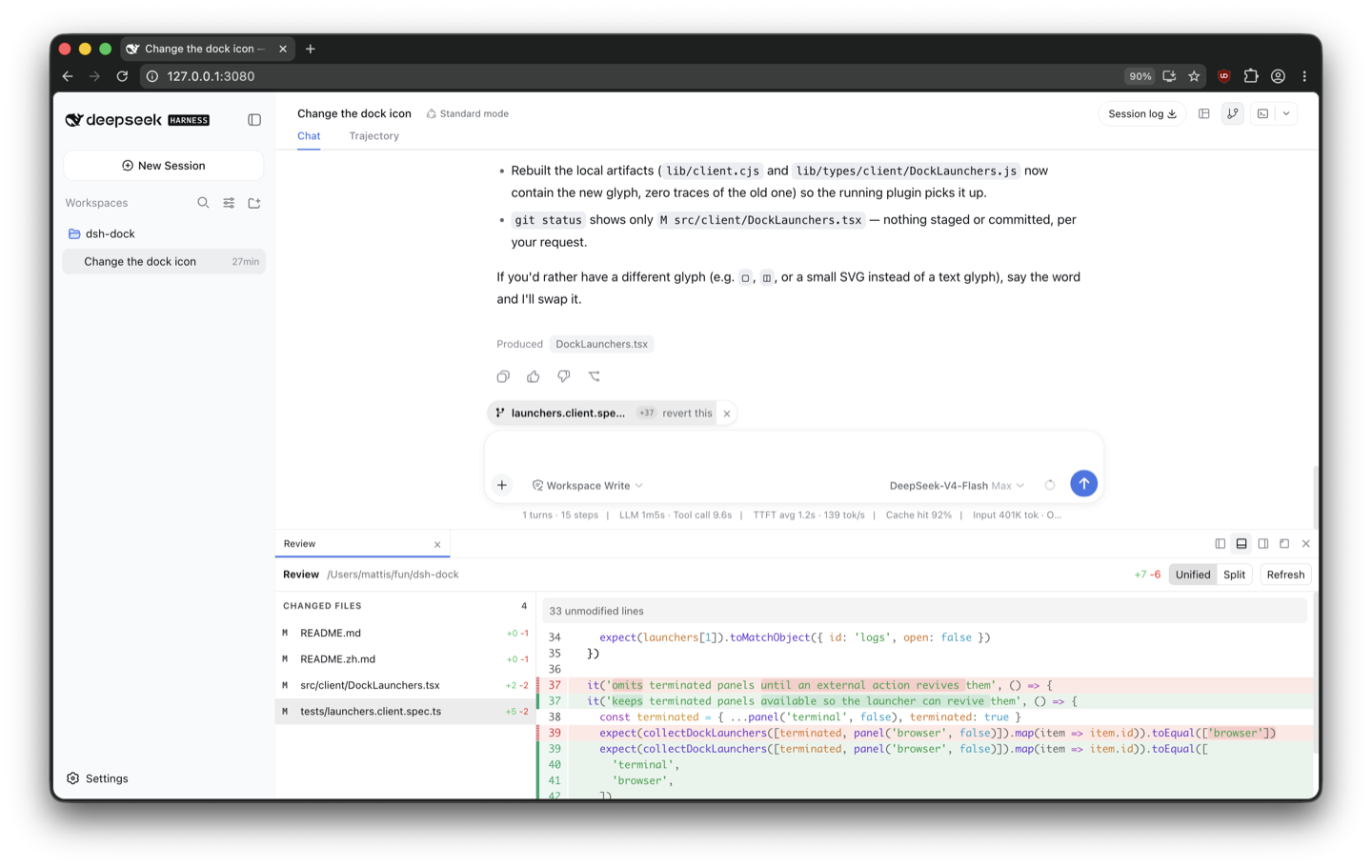 ## What it does `dsh-git` adds a session-scoped **Review** panel to [`dsh-dock`](https://github.com/mattismegevand/dsh-dock). It shows the current repository's tracked working-tree diff against `HEAD`, lists untracked paths, and supports unified and split rendering with Pierre. Hover a diff gutter and use the comment button to start a review; drag across line numbers or Shift-click another line to select a contiguous range, write the comment inline, then choose **Add comment**. Added comments become compact pills above the normal chat composer. Click a pill to inspect its file, range, selected lines, and comment, or remove it with its × button. You can collect several comments and add ordinary prose in the composer; nothing reaches the agent until you use the normal Send button. The panel and Pierre renderer follow the active Harness light or dark theme, including live theme changes. An icon-only toggle beside the session-header Open control shows or hides Review. The plugin does not add a fallback button to the chat composer or an entry to the generic Panels launcher. Version 1 is deliberately read-only. It does not stage, apply, commit, reset, switch branches, manage worktrees, or integrate with a forge. ## Install Requires [`dsh-dock`](https://github.com/mattismegevand/dsh-dock), the [`dsh`](https://www.npmjs.com/package/@deepseek-ai/dsh) CLI (Node.js 22.19+ or 24), and pnpm 10+. The panel starts closed and loads the active session's repository only when opened. ### From npm ```sh dsh plugin --profile web add @mattismegevand/dsh-git ``` ### From GitHub ```sh dsh plugin --profile web add github:mattismegevand/dsh-git ``` Git installs fetch sources, so pnpm runs the package's `prepare` build on first add. pnpm ≥10 refuses that until you allow it: copy the exact package key pnpm printed into the profile's `pnpm-workspace.yaml` `allowBuilds` entry, then re-run the same `add`. ### Develop locally ```sh git clone https://github.com/mattismegevand/dsh-git.git cd dsh-git corepack pnpm install corepack pnpm check:all dsh plugin --profile web add . ``` ## Configuration - `maxRequestBytes` bounds request bodies (default: 32 KiB). - `maxPatchBytes` bounds complete Git outputs (default: 8 MiB). - `maxFileBytes` omits individual file patches above the limit (default: 2 MiB). - `gitTimeoutMs` bounds each Git subprocess (default: 10 seconds). ## Safety and lifecycle Git is resolved through the Harness subprocess service and invoked with exact argument arrays. Prompts, pagers, external diffs, and text conversion are disabled. Reads are timed out, cancellable, output-bounded, and confined with the session sandbox unless the session already runs in danger-full-access mode. Binary files, submodules, oversized patches, and unsupported entries are listed but not rendered. Untracked file contents are never read. Each pending comment is revalidated against the displayed diff revision while the normal composer submission serializes it. A changed diff blocks submission and leaves the comment available to inspect or remove. Host routes, dock registrations, input-reference registrations, locale dictionaries, and browser styles are reversible Cordis effects. ## Related plugins - [dsh-dock](https://github.com/mattismegevand/dsh-dock) — the docking system that hosts this panel. - [dsh-terminal](https://github.com/mattismegevand/dsh-terminal) — VS Code-style Ghostty terminal panel. - [dsh-open](https://github.com/mattismegevand/dsh-open) — Codex-style workspace Open menu in the session header. ## Model experience The plugin adds no tools, prompt sections, automatic model calls, or independent follow-ups. Pending comments are browser-owned composer references. Normal submission expands each reference into the path, side, bounded line range, selected diff text, and comment, alongside any additional text you wrote. This has no independent KV-cache effect. ## Known limitations The first release reviews only `HEAD` against the working tree. It intentionally does not display untracked file contents, forge metadata, staged and unstaged changes separately, or mutation controls. ## License MIT
数据来源:公开的 DeepSeek Harness 插件目录与各插件 GitHub 仓库。本站为独立第三方目录,与 DeepSeek、幻方(High-Flyer)及插件作者均无隶属或背书关系。

