dsh-open
Codex 风格的工作区「打开」菜单:列出 dock 面板、系统文件管理器与编辑器
mattismegevand
@mattismegevand
⬇ 1
★ 0
main
安装
dsh plugin --profile web add github:mattismegevand/dsh-open
需要可复现安装时,可在仓库后追加 #commit 固定提交。
Codex 风格的工作区「打开」菜单:列出 dock 面板、系统文件管理器与编辑器
该插件未提供要点说明,请参考仓库 README。
cordisdeepseek-harnessdshdsh-pluginlauncherui
- 安装并启动 DeepSeek Harness:
npx @deepseek-ai/dsh web - 在终端执行上面的安装命令(CLI 会解析插件并核验来源)
- 用 dsh plugins list 确认已安装,必要时重启 Harness 生效
插件以当前 dsh 进程的权限运行,安装时可能执行代码。请先通读仓库源码与许可证,确认无破坏性命令与越权访问;本站只做索引,不对第三方插件安全性作担保。
| 代码仓库 | github.com/mattismegevand/dsh-open |
| 许可证 | MIT |
| 主要语言 | main |
| 下载量 | 1 |
| GitHub 星标 | 0 |
| 最近推送 | 2026-08-16 |
| 收录日期 | 2026-09-19 |
| 分类 | 通知与集成 |
事实信息来自公开插件目录快照(2026-10-01),介绍文案由本站再加工。
以下为插件仓库 README 全文(原始内容,由公开目录抓取整理)。
# dsh-open
English | [中文](README.zh.md)
> A standalone DeepSeek Harness Web plugin that adds a compact split Open action to each conversation header, listing dock panels, the platform file manager, and your editors.
[](LICENSE)
[](https://github.com/topics/dsh-plugin)
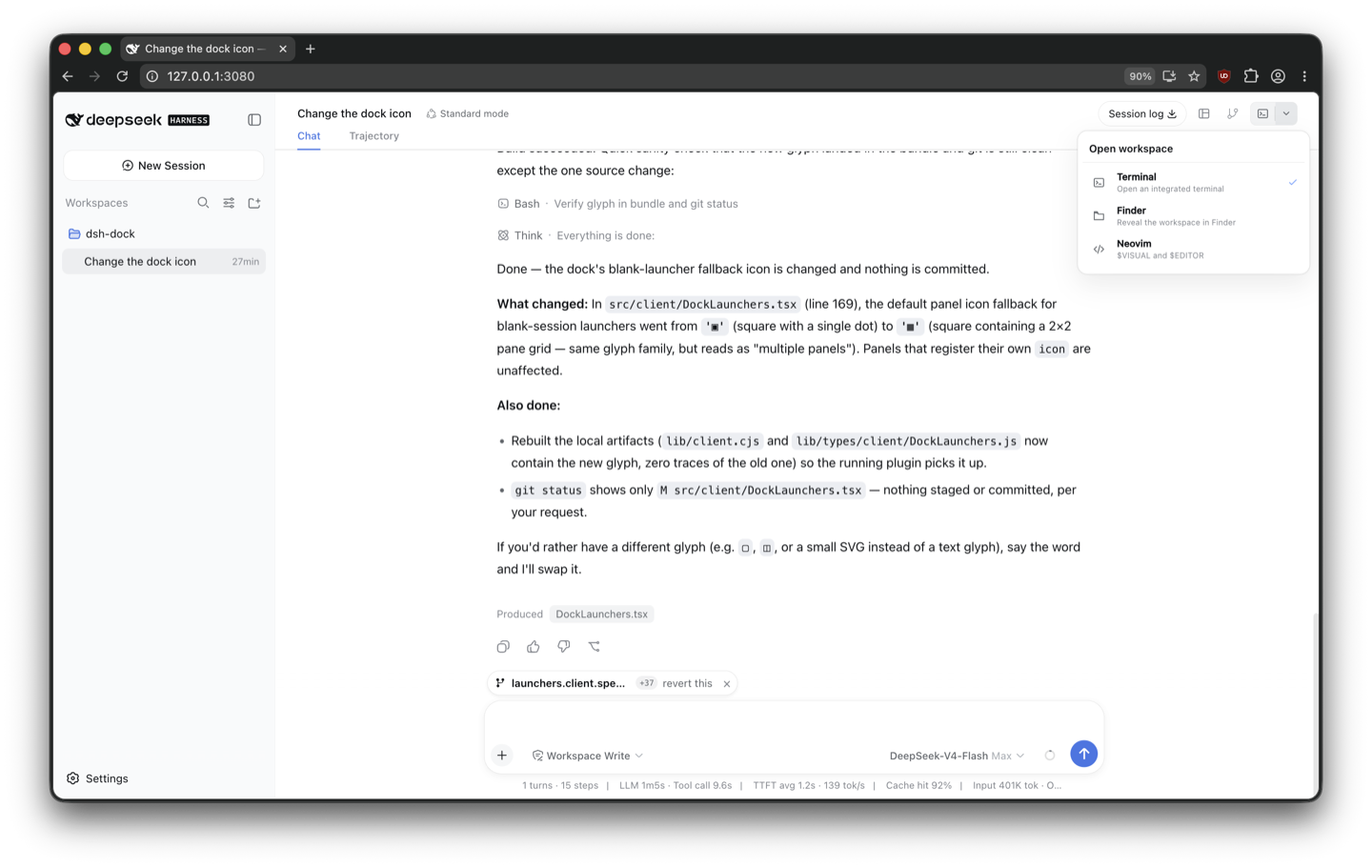
## What it does
- The main icon opens the last selected available target.
- The chevron lists registered dock panels, the platform file manager, and editors selected by `$VISUAL` and `$EDITOR`.
- With one available target, the control collapses to one button.
- Internal tools use `ctx.dock.open(panelId)` and appear only while their panel is registered.
- Native actions are resolved on the Host. The browser sends only a session id and a closed action id; it cannot choose a filesystem path or executable.
- Same-origin checks, bounded request bodies, environment scrubbing, and a launch timeout protect native invocation.
## Install
Requires [`dsh-dock`](https://github.com/mattismegevand/dsh-dock), the [`dsh`](https://www.npmjs.com/package/@deepseek-ai/dsh) CLI (Node.js 22.19+ or 24), and pnpm 10+.
### From npm
```sh
dsh plugin --profile web add @mattismegevand/dsh-open
```
### From GitHub
```sh
dsh plugin --profile web add github:mattismegevand/dsh-open
```
Git installs fetch sources, so pnpm runs the package's `prepare` build on first add. pnpm ≥10 refuses that until you allow it: copy the exact package key pnpm printed into the profile's `pnpm-workspace.yaml` `allowBuilds` entry, then re-run the same `add`.
### Develop locally
```sh
git clone https://github.com/mattismegevand/dsh-open.git
cd dsh-open
corepack pnpm install
corepack pnpm check:all
dsh plugin --profile web add .
```
The shipped patch inserts the Host row automatically.
## Configuration
```yaml
- id: open
name: '@mattismegevand/dsh-open'
config:
preferredAction: visual
terminalPanelId: terminal
maxRequestBytes: 8192
launchTimeoutMs: 10000
```
The configured action is the initial preference for a fresh browser profile. Menu selection updates a browser-local preference. `$VISUAL` and `$EDITOR` are resolved on `PATH` and deduplicated. The file-manager action uses Finder on macOS, File Explorer on Windows, and the system opener on Linux.
## Related plugins
- [dsh-dock](https://github.com/mattismegevand/dsh-dock) — the docking system that registers the internal panel targets.
- [dsh-terminal](https://github.com/mattismegevand/dsh-terminal) — VS Code-style Ghostty terminal panel.
- [dsh-git](https://github.com/mattismegevand/dsh-git) — session-scoped working-tree Review panel.
## Model experience
### Workspace Open UI
#### What the model sees
Nothing. The plugin launches UI panels or native applications from a human-operated browser control and registers no prompt, tool schema, or model-visible message.
#### Token effect
Zero tokens are added to model requests or responses.
#### KV Cache effect
None. Selecting or launching an Open target does not alter the model input prefix.
## Known limitations
- Native capability discovery runs when the client store loads and is not refreshed while that store remains mounted.
- Native launch failures are surfaced as concise errors; platform-specific recovery actions such as revealing Finder permission settings are not implemented.
- Internal targets depend on live dock registrations, and native targets remain local-host only.
## License
MIT
数据来源:公开的 DeepSeek Harness 插件目录与各插件 GitHub 仓库。本站为独立第三方目录,与 DeepSeek、幻方(High-Flyer)及插件作者均无隶属或背书关系。

