dsh-terminal
为 DeepSeek Harness Web UI 提供响应式多标签 Ghostty 终端面板。
mattismegevand
@mattismegevand
⬇ 2
★ 0
main
安装
dsh plugin --profile web add github:mattismegevand/dsh-terminal
需要可复现安装时,可在仓库后追加 #commit 固定提交。
为 DeepSeek Harness Web UI 提供响应式多标签 Ghostty 终端面板。
该插件未提供要点说明,请参考仓库 README。
cordisdeepseek-harnessdshdsh-pluginghosttypty
- 安装并启动 DeepSeek Harness:
npx @deepseek-ai/dsh web - 在终端执行上面的安装命令(CLI 会解析插件并核验来源)
- 用 dsh plugins list 确认已安装,必要时重启 Harness 生效
插件以当前 dsh 进程的权限运行,安装时可能执行代码。请先通读仓库源码与许可证,确认无破坏性命令与越权访问;本站只做索引,不对第三方插件安全性作担保。
| 代码仓库 | github.com/mattismegevand/dsh-terminal |
| 许可证 | MIT |
| 主要语言 | main |
| 下载量 | 2 |
| GitHub 星标 | 0 |
| 最近推送 | 2026-08-16 |
| 收录日期 | 2026-09-19 |
| 分类 | 界面增强 |
事实信息来自公开插件目录快照(2026-10-01),介绍文案由本站再加工。
以下为插件仓库 README 全文(原始内容,由公开目录抓取整理)。
# dsh-terminal
English | [中文](README.zh.md)
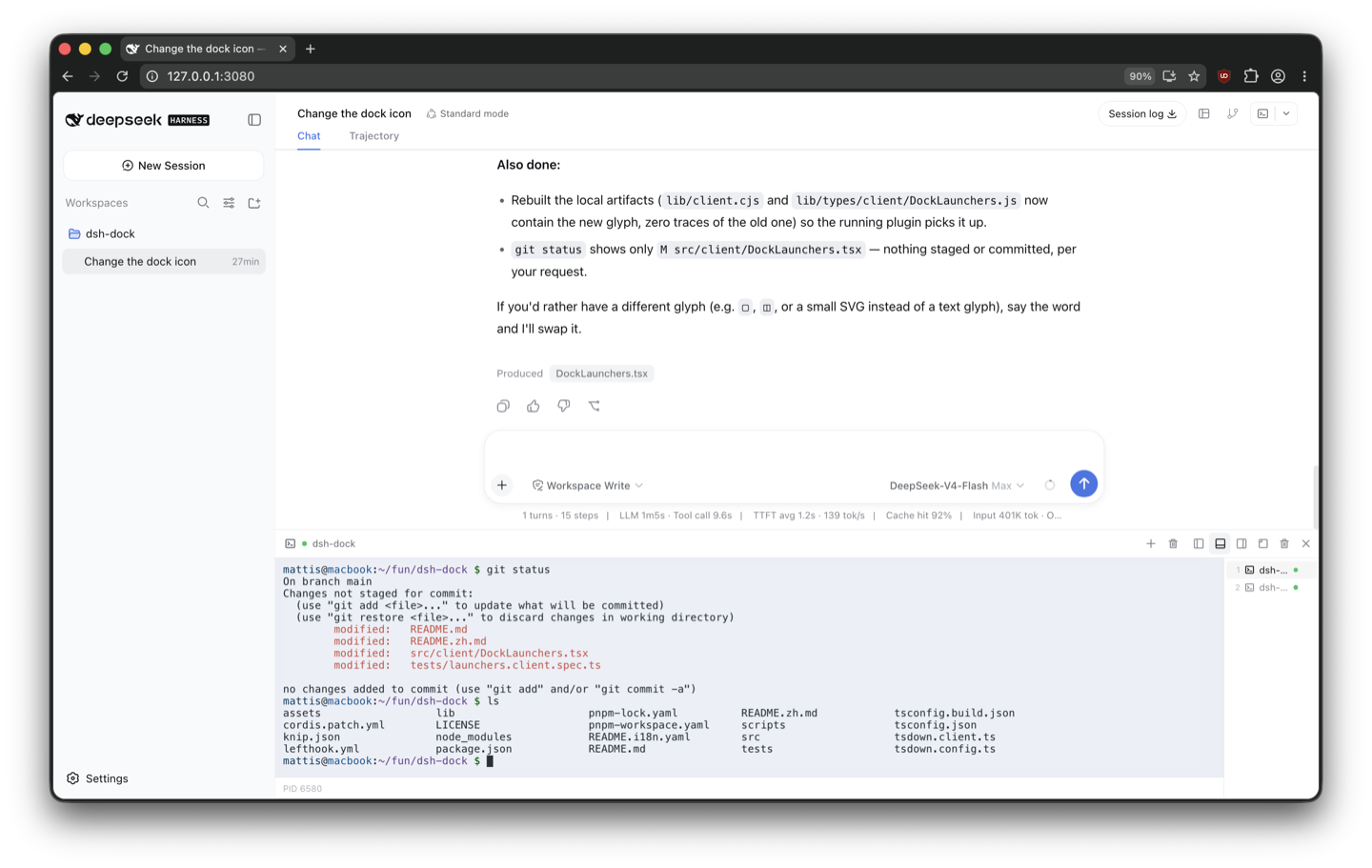
> A VS Code-style terminal panel for DeepSeek Harness Web. It renders with [ghostty-web](https://github.com/coder/ghostty-web), serves Ghostty's versioned WASM as an immutable asset, and connects to a local PTY through `node-pty`. Placement and resizing come from [`dsh-dock`](https://github.com/mattismegevand/dsh-dock).
[](LICENSE)
[](https://github.com/topics/dsh-plugin)
## What it does
- Multiple terminals per Harness session with a responsive tab tray.
- Left, right, bottom, and floating placement through `dsh-dock`.
- Live detachment and rejoining of terminal panes without restarting PTYs.
- Resize propagation, truecolor, Unicode, selection, paste, scrollback, and full-screen programs.
- Live light/dark palette synchronization with the active Harness theme.
- Shell titles that follow the workspace, foreground process, and app-provided terminal title.
- PTYs remain alive when a panel hides or moves, and stop when their tab, plugin, browser page, or Harness process closes.
- Optional confinement by the session's current Harness sandbox policy.
- Same-origin WebSocket fencing, bounded input, per-session caps, scrubbed environments, and output backpressure.
## Install
Requires [`dsh-dock`](https://github.com/mattismegevand/dsh-dock), the [`dsh`](https://www.npmjs.com/package/@deepseek-ai/dsh) CLI (Node.js 22.19+ or 24), and pnpm 10+.
### From npm
```sh
dsh plugin --profile web add @mattismegevand/dsh-terminal
```
### From GitHub
```sh
dsh plugin --profile web add github:mattismegevand/dsh-terminal
```
Git installs fetch sources, so pnpm runs the package's `prepare` build on first add. pnpm ≥10 refuses that until you allow it: copy the exact package key pnpm printed into the profile's `pnpm-workspace.yaml` `allowBuilds` entry, then re-run the same `add`.
### Develop locally
```sh
git clone https://github.com/mattismegevand/dsh-terminal.git
cd dsh-terminal
corepack pnpm install
corepack pnpm check:all
dsh plugin --profile web add .
```
`node-pty` is native. If pnpm adds an `allowBuilds.node-pty` placeholder to the Web profile workspace, set it to `true` and rerun the same plugin-add command.
## Usage
Open a session and select **Terminal**. Use **+** or `Ctrl+Shift+\`` for another shell. Drag a tray row to detach it; docking terminal panes on the same edge rejoins their live terminals. The panel **×** hides a pane, while the tray trash action ends its shell.
## Configuration
```yaml
- id: terminal
name: '@mattismegevand/dsh-terminal'
config:
shellPath: /bin/zsh
shellArgs: ['-l']
maxTerminalsPerSession: 12
maxCols: 400
maxRows: 200
disposeGraceMs: 2000
respectSandbox: false
outputHighWaterBytes: 2097152
outputLowWaterBytes: 524288
processTitlePollMs: 500
initialCols: 100
initialRows: 30
fontSize: 13
scrollback: 10000
```
With `respectSandbox: true`, the terminal uses the session's sandbox mode. In `workspace-write`, shells may warn that they cannot update history or other files outside the workspace; that is expected.
## Related plugins
- [dsh-dock](https://github.com/mattismegevand/dsh-dock) — the docking system that hosts this panel.
- [dsh-open](https://github.com/mattismegevand/dsh-open) — Codex-style workspace Open menu in the session header.
- [dsh-git](https://github.com/mattismegevand/dsh-git) — session-scoped working-tree Review panel.
## Model experience
### Human-operated terminal UI
#### What the model sees
Nothing. Terminal input and output travel between the human-operated browser terminal and its PTY; the plugin registers no model prompt, tool, or conversation message.
#### Token effect
Zero tokens are added to model requests or responses. Terminal output is not copied into model context.
#### KV Cache effect
None. PTY activity does not alter the main model request prefix.
## Known limitations
- The terminal is local-host only. Remote providers require a resize-capable Harness PTY contract.
- PTYs intentionally do not survive a browser refresh, plugin reload, Harness shutdown, or explicit tab close.
- `respectSandbox` follows the current local sandbox provider; changing mode requires closing active terminals first.
- The Ghostty WASM asset path is versioned with the pinned `ghostty-web` dependency and must change when that asset is upgraded.
## License
MIT
数据来源:公开的 DeepSeek Harness 插件目录与各插件 GitHub 仓库。本站为独立第三方目录,与 DeepSeek、幻方(High-Flyer)及插件作者均无隶属或背书关系。

