commandcode-dash
非官方 DeepSeek Harness 设置面板插件,接入 Command Code:显示额度、用量窗口并同步模型目录。
momonaka
@momonaka
⬇ 2
★ 2
main
安装
dsh plugin --profile web add github:momonaka/commandcode-dash
需要可复现安装时,可在仓库后追加 #commit 固定提交。
非官方 DeepSeek Harness 设置面板插件,接入 Command Code:显示额度、用量窗口并同步模型目录。
该插件未提供要点说明,请参考仓库 README。
aicommand-codedeepseekdeepseek-harnessdeepseek-harness-pluginplugin
- 安装并启动 DeepSeek Harness:
npx @deepseek-ai/dsh web - 在终端执行上面的安装命令(CLI 会解析插件并核验来源)
- 用 dsh plugins list 确认已安装,必要时重启 Harness 生效
插件以当前 dsh 进程的权限运行,安装时可能执行代码。请先通读仓库源码与许可证,确认无破坏性命令与越权访问;本站只做索引,不对第三方插件安全性作担保。
| 代码仓库 | github.com/momonaka/commandcode-dash |
| 许可证 | MIT |
| 主要语言 | main |
| 下载量 | 2 |
| GitHub 星标 | 2 |
| 最近推送 | 2026-09-15 |
| 收录日期 | 2026-09-19 |
| 分类 | 工具与能力 |
事实信息来自公开插件目录快照(2026-10-01),介绍文案由本站再加工。
以下为插件仓库 README 全文(原始内容,由公开目录抓取整理)。
# commandcode-dash
English | [中文](README.zh.md)
> Command Code credits, usage windows, and model catalog — inside the DeepSeek Harness settings panel.
>
> **Unofficial community plugin.** Not affiliated with DeepSeek or Command Code.
[](https://github.com/Momonaka/commandcode-dash/actions/workflows/ci.yml)
[](#)
[](#)
[](#)
[](LICENSE)
A [DeepSeek Harness](https://github.com/deepseek-ai/deepseek-harness) (DSH) web
plugin that adds a **Command Code** section to the settings panel:
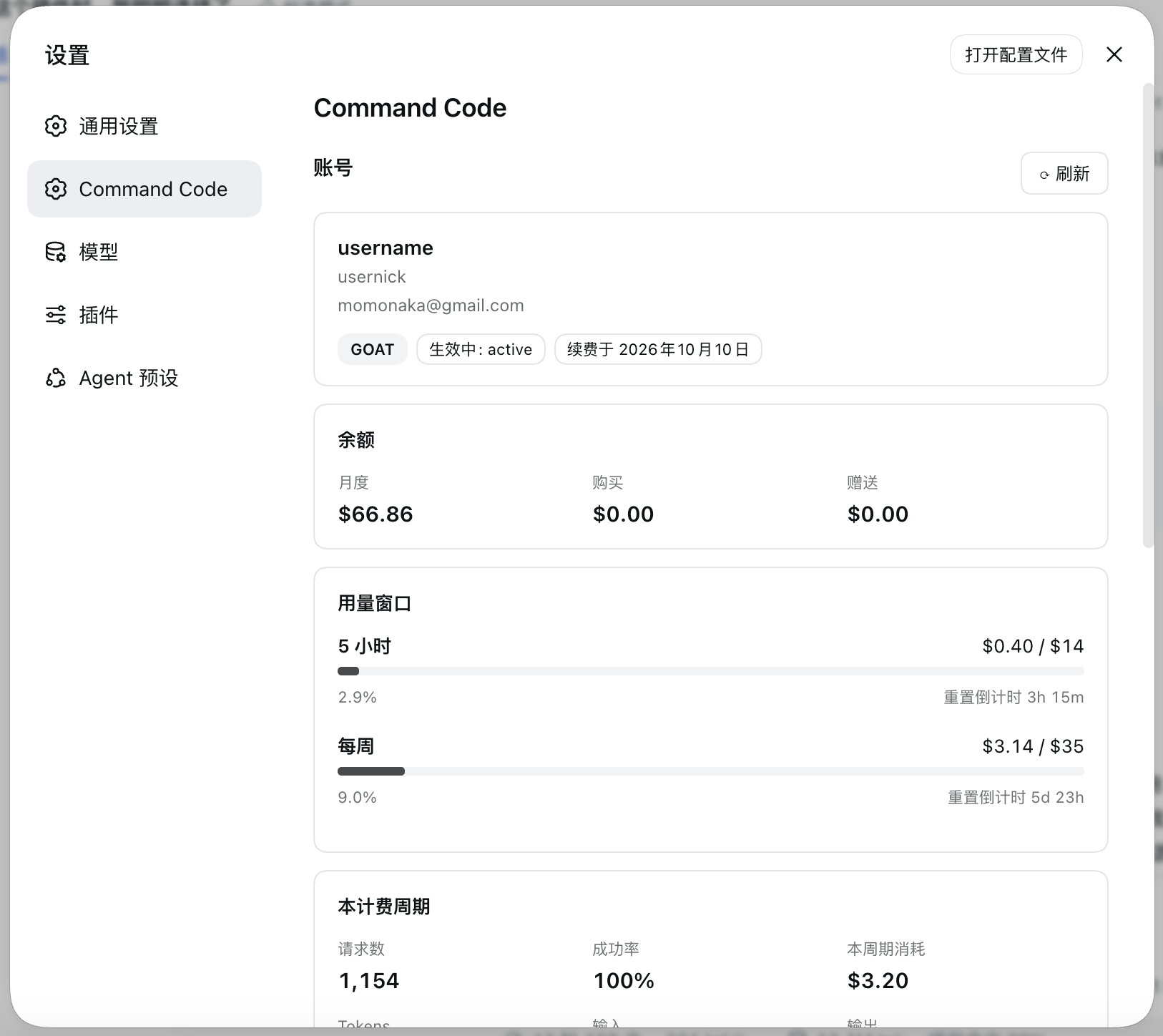
- Plan, credit balance, the 5-hour and weekly usage windows with live reset
countdowns, and the current billing period's totals.
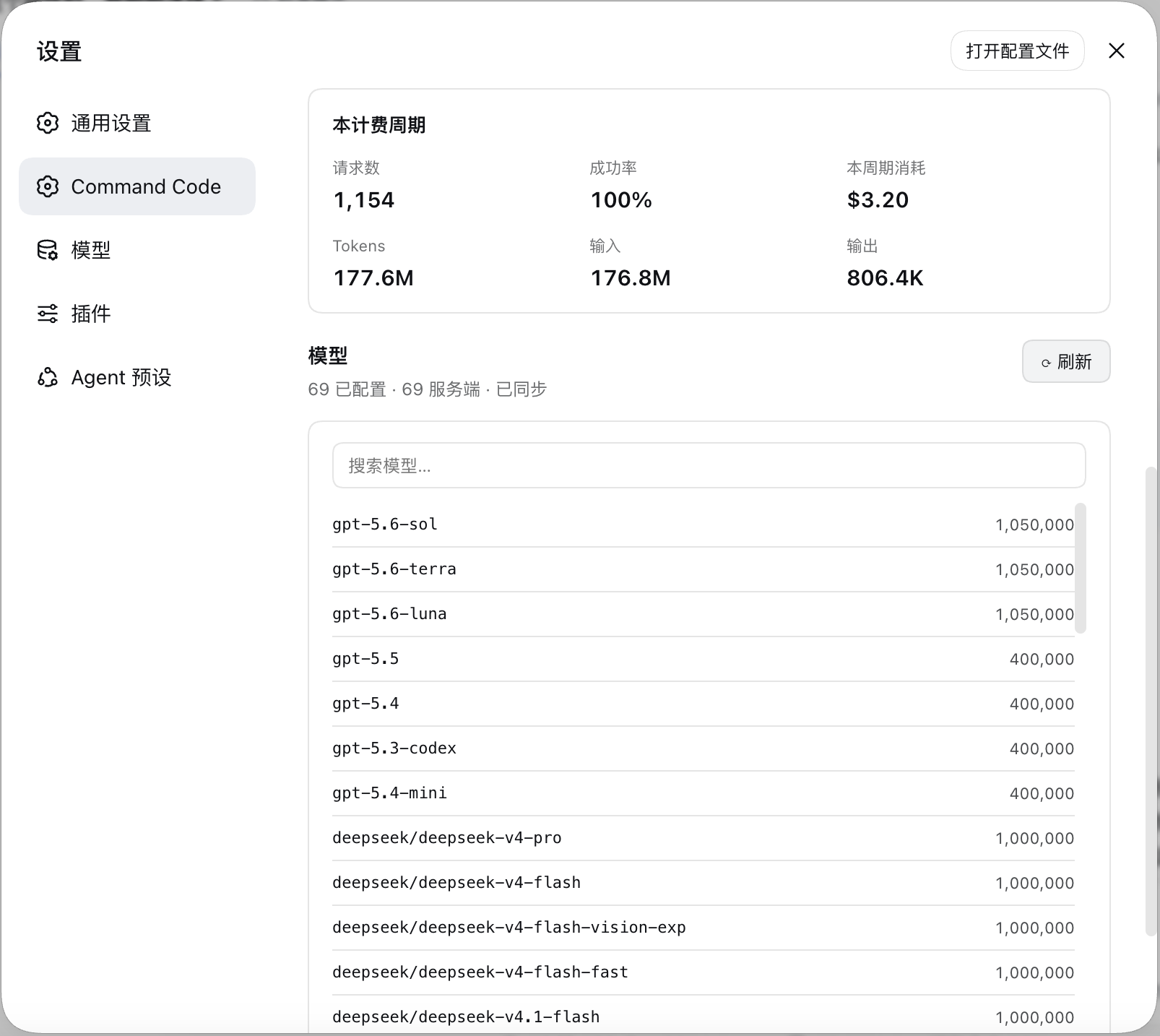
- The configured model catalog, diffed against the live `provider/v1/models`
catalog — with a one-click sync.
## Features
| | |
|---|---|
| **Credits** | Monthly, purchased, and free credit balances from the live billing API. |
| **Usage windows** | 5-hour and weekly windows as `used / cap` with progress bars and `resets in …` countdowns that tick without refetching. |
| **Billing period** | Requests, success rate, credits consumed, and token totals. |
| **Model catalog** | Every configured model with its context window, searchable. |
| **Catalog sync** | Diffs the live catalog against your config, then applies additions, context-window fills, and removals — each on your say-so. |
| **Setup card** | When no key is configured, the section becomes a form that stores one write-only. |
| **Sign out** | A text button at the bottom of the section opens a confirmation dialog, then forgets the stored key and puts the section back on the setup card. |
| **Load once** | The section loads on your first visit and renders that same answer on later visits; the account header's ⟳ reloads both routes on demand. |
## Preview
## Requirements
- A DSH install with the `web` profile available.
- A Command Code plan with Provider API access — **every plan except Go**.
- Node 20+ on the host (the plugin uses `AbortSignal.any`).
## Installation
### From npm
```sh
dsh plugin --profile web add commandcode-dash
```
Restart `dsh web`.
## Configuration
### The API key
The key is read from exactly one place: the harness credential store, under the
reference `COMMANDCODE_API_KEY`. The section's own setup card writes it there,
or you can add it by hand:
```yaml
# ${DSH_HOME:-$HOME/.dsh}/.credentials.yaml
refs:
COMMANDCODE_API_KEY: user_…
```
It is resolved host-side once per request, so saving one takes effect on the next
refresh — no restart. **Sign out** at the bottom of the section asks for
confirmation, then forgets the stored key and returns the section to the setup
card; the `llm-pi-ai` routes it created are left in place, since they are
configuration you also edit by hand.
### The model provider
Saving the key is the whole setup. Once it checks out, the section adds the
`llm-pi-ai` provider routes itself, using the catalog fetched from
`provider/v1/models`:
| Route | Protocol | Models |
|---|---|---|
| `commandcode` | `openai-completions` | everything except Claude |
| `commandcode-anthropic` | `anthropic-messages` | Claude, which Command Code only serves over `/messages` |
## Disclaimer
This is an **unofficial, community-built** plugin. It is not affiliated with,
endorsed by, or sponsored by DeepSeek or Command Code, and it is not part of
either product.
It talks to Command Code's Provider API using **your own** API key, over the same
endpoints the Command Code CLI uses for its own usage screen. Nothing is sent
anywhere else.
数据来源:公开的 DeepSeek Harness 插件目录与各插件 GitHub 仓库。本站为独立第三方目录,与 DeepSeek、幻方(High-Flyer)及插件作者均无隶属或背书关系。

