dbhub
DSH plugin: manage dbhub database MCP servers from the settings panel; starts dbhub in-process (no npx) and exposes its tools via dsh-mcp-client.
xcr1234
@xcr1234
⬇ 1
★ 0
main
安装
dsh plugin --profile web add github:xcr1234/dbhub
需要可复现安装时,可在仓库后追加 #commit 固定提交。
DSH plugin: manage dbhub database MCP servers from the settings panel; starts dbhub in-process (no npx) and exposes its tools via dsh-mcp-client.
该插件未提供要点说明,请参考仓库 README。
- 安装并启动 DeepSeek Harness:
npx @deepseek-ai/dsh web - 在终端执行上面的安装命令(CLI 会解析插件并核验来源)
- 用 dsh plugins list 确认已安装,必要时重启 Harness 生效
插件以当前 dsh 进程的权限运行,安装时可能执行代码。请先通读仓库源码与许可证,确认无破坏性命令与越权访问;本站只做索引,不对第三方插件安全性作担保。
| 代码仓库 | github.com/xcr1234/dbhub |
| 许可证 | MIT |
| 主要语言 | main |
| 下载量 | 1 |
| GitHub 星标 | 0 |
| 最近推送 | 2026-08-31 |
| 收录日期 | 2026-09-19 |
| 分类 | 模型与提供方 |
事实信息来自公开插件目录快照(2026-10-01),介绍文案由本站再加工。
以下为插件仓库 README 全文(原始内容,由公开目录抓取整理)。
# My fork version
`npm i @xcr1234/dbhub-fork`
1. Remove better-sqlite3
2.Add oracle support, for example:
```bash
docker run -d \
--name oracle-test \
-p 1521:1521 \
-e ORACLE_PASSWORD=MyStrongPassword123 \
gvenzl/oracle-free:latest
```
```toml
[[sources]]
id = "oracle_db"
dsn = "oracle://SYSTEM:MyStrongPassword123@localhost:1521/FREEPDB1"
```
3.implement the search_objects UI.

> > [!NOTE]
> Brought to you by [Bytebase](https://www.bytebase.com/), open-source database DevSecOps platform.
[图片: DBHub Logo]
```bash
+------------------+ +--------------+ +------------------+
| | | | | |
| | | | | |
| Claude Desktop +--->+ +--->+ PostgreSQL |
| | | | | |
| Claude Code +--->+ +--->+ SQL Server |
| | | | | |
| Cursor +--->+ DBHub +--->+ SQLite |
| | | | | |
| VS Code +--->+ +--->+ MySQL |
| | | | | |
| Copilot CLI +--->+ +--->+ MariaDB |
| | | | | |
| | | | | |
+------------------+ +--------------+ +------------------+
MCP Clients MCP Server Databases
```
DBHub is a zero-dependency, token efficient MCP server implementing the Model Context Protocol (MCP) server interface. This lightweight gateway allows MCP-compatible clients to connect to and explore different databases:
- **Local Development First**: Zero dependency, token efficient with just two MCP tools to maximize context window
- **Multi-Database**: PostgreSQL, MySQL, MariaDB, SQL Server, and SQLite through a single interface
- **Multi-Connection**: Connect to multiple databases simultaneously with TOML configuration
- **Guardrails**: Read-only mode, row limiting, and query timeout to prevent runaway operations
- **Secure Access**: SSH tunneling and SSL/TLS encryption
## Supported Databases
PostgreSQL, MySQL, SQL Server, MariaDB, and SQLite.
## MCP Tools
DBHub implements MCP tools for database operations:
- **[execute_sql](https://dbhub.ai/tools/execute-sql)**: Execute SQL queries with transaction support and safety controls
- **[search_objects](https://dbhub.ai/tools/search-objects)**: Search and explore database schemas, tables, columns, indexes, and procedures with progressive disclosure
- **[Custom Tools](https://dbhub.ai/tools/custom-tools)**: Define reusable, parameterized SQL operations in your `dbhub.toml` configuration file
## Workbench
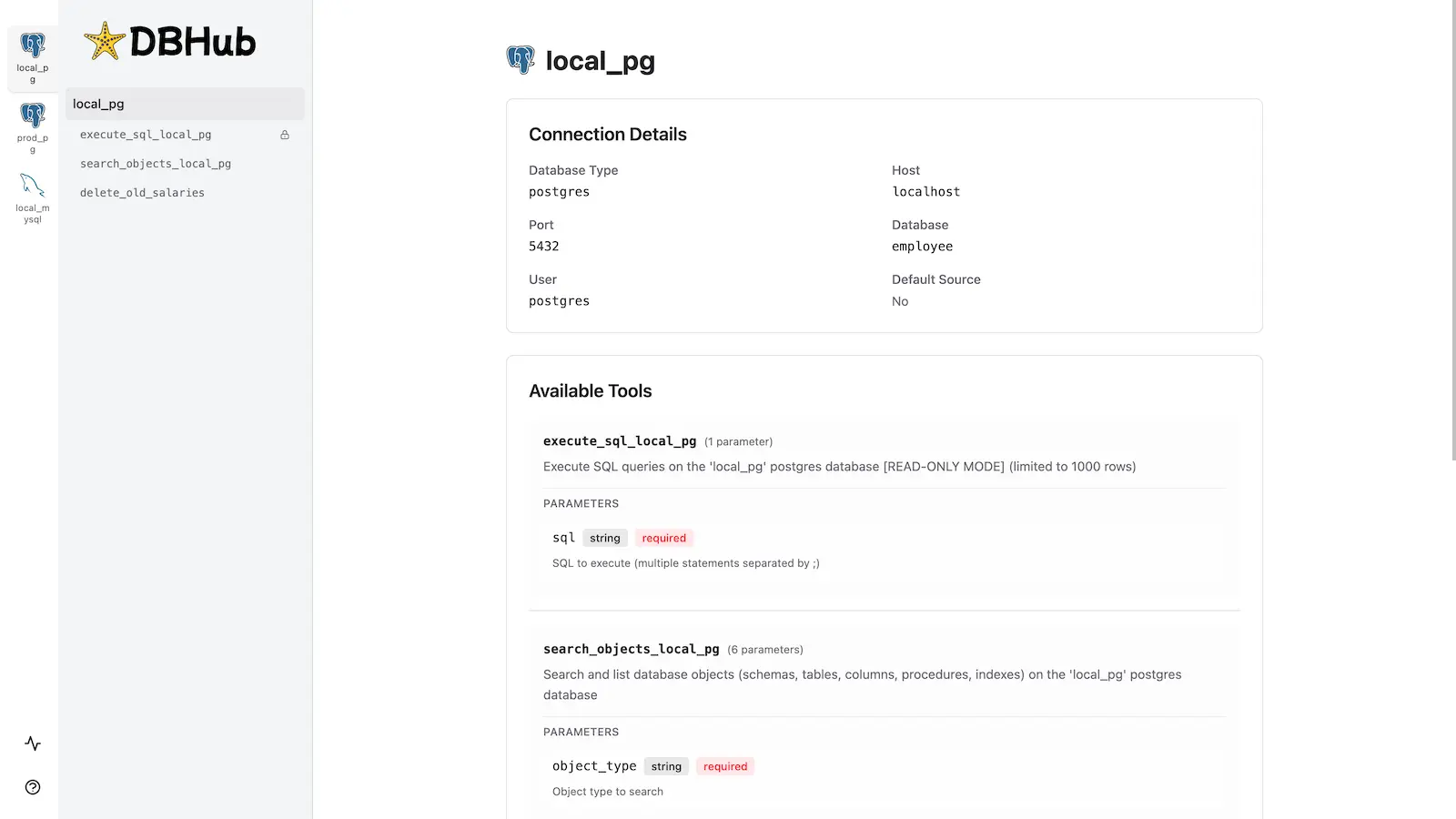
DBHub includes a [built-in web interface](https://dbhub.ai/workbench/overview) for interacting with your database tools. It provides a visual way to execute queries, run custom tools, and view request traces without requiring an MCP client.
## Installation
See the full [Installation Guide](https://dbhub.ai/installation) for detailed instructions.
### Quick Start
**Docker:**
```bash
docker run --rm --init \
--name dbhub \
--publish 8080:8080 \
bytebase/dbhub \
--transport http \
--port 8080 \
--dsn "postgres://user:password@localhost:5432/dbname?sslmode=disable"
```
**NPM:**
```bash
npx @bytebase/dbhub@latest --transport http --port 8080 --dsn "postgres://user:password@localhost:5432/dbname?sslmode=disable"
```
**Demo Mode:**
```bash
npx @bytebase/dbhub@latest --transport http --port 8080 --demo
```
See [Command-Line Options](https://dbhub.ai/config/command-line) for all available parameters.
### Multi-Database Setup
Connect to multiple databases simultaneously using TOML configuration files. Perfect for managing production, staging, and development databases from a single DBHub instance.
See [Multi-Database Configuration](https://dbhub.ai/config/toml) for complete setup instructions.
## Development
```bash
# Install dependencies
pnpm install
# Run in development mode
pnpm dev
# Build and run for production
pnpm build && pnpm start --transport stdio --dsn "postgres://user:password@localhost:5432/dbname"
```
See [Testing](.claude/skills/testing/SKILL.md) and [Debug](https://dbhub.ai/config/debug).
## Contributors
## Star History
[图片: Star History Chart]
数据来源:公开的 DeepSeek Harness 插件目录与各插件 GitHub 仓库。本站为独立第三方目录,与 DeepSeek、幻方(High-Flyer)及插件作者均无隶属或背书关系。

