dsh-universal-palette
DSH Web 的通用命令面板(玻璃质感):一次按键搜索并执行命令、模型、会话与对话历史命中项
yunmin311
@yunmin311
⬇ 1
★ 1
main
安装
dsh plugin --profile web add github:yunmin311/dsh-universal-palette
需要可复现安装时,可在仓库后追加 #commit 固定提交。
DSH Web 的通用命令面板(玻璃质感):一次按键搜索并执行命令、模型、会话与对话历史命中项
该插件未提供要点说明,请参考仓库 README。
command-palettedeepseek-harnessdsh-pluginproductivitytypescriptcordis
- 安装并启动 DeepSeek Harness:
npx @deepseek-ai/dsh web - 在终端执行上面的安装命令(CLI 会解析插件并核验来源)
- 用 dsh plugins list 确认已安装,必要时重启 Harness 生效
插件以当前 dsh 进程的权限运行,安装时可能执行代码。请先通读仓库源码与许可证,确认无破坏性命令与越权访问;本站只做索引,不对第三方插件安全性作担保。
| 代码仓库 | github.com/yunmin311/dsh-universal-palette |
| 许可证 | MIT |
| 主要语言 | main |
| 下载量 | 1 |
| GitHub 星标 | 1 |
| 最近推送 | 2026-09-14 |
| 收录日期 | 2026-09-19 |
| 分类 | 界面增强 |
事实信息来自公开插件目录快照(2026-10-01),介绍文案由本站再加工。
以下为插件仓库 README 全文(原始内容,由公开目录抓取整理)。
# dsh-universal-palette [](https://www.npmjs.com/package/@yunmin311/dsh-universal-palette) [](https://github.com/yunmin311/dsh-universal-palette/releases) [](LICENSE) [](docs/COMPATIBILITY.md) [](package.json) [](https://github.com/yunmin311/dsh-universal-palette/actions/workflows/ci.yml) Language: English | [简体中文](README.zh-CN.md) A command, session, model, and history surface for DeepSeek Harness Web — one keystroke, everything running in the current workspace.  ## Why Universal Palette DSH grows capabilities through plugins: each release and each community plugin can add Host commands, client command UIs, models, and reference sources. The native surfaces for these live in different places — the slash menu, the model selector, the sidebar, the composer's `@` menu — and none of them answer the one question a keyboard-first user actually has: *what can I do right now, in this workspace, and how do I get there?* Universal Palette gives that shared search controller two presentations: contextual Composer Search and a global Floating Palette. It owns no second catalog: every command, session, model, and history hit it shows comes from DSH's public Client APIs at query time, so the Palette is automatically correct as DSH and its ecosystem change. It is built to stay out of the way: DSH's own design tokens, glass over the native surface, locale-following copy, and zero behavior change for anything it does not have a verified public contract with. ## Features - **Commands** — the complete live Host command catalog, searched and executed through official APIs; new Host commands from DSH or any plugin appear automatically with zero adaptation. - **Models** — the session's real model directory with the current selection, submitted through the public selection contract. - **Sessions** — current-first session navigation with stable identity dedupe, no title-based merging. - **Conversation Hits** — full-text history search via DSH's own session search, with snippet and metadata. - **Deterministic relevance** — exact-prefix-first scoring with a minimum relevance gate; recency and context only order genuinely relevant rows. - **Native look and locale** — DSH design tokens, official menu typography and elevation, glass surface, zh/en copy following DSH's locale. - **Public-contract interoperability** — capability-detected cooperation with community plugins; no private registry reads, no hard dependencies. ## Quick Start ```powershell dsh plugin --profile web add @yunmin311/dsh-universal-palette@0.2.1 dsh --profile web ``` **Composer search** - Type `/find` from the native DSH slash menu, or use the Search button. Bare `/` remains owned by DSH. - The Composer remains the only query input. `/find query` stays in the Composer, while the Search button opens the same search directly from the current draft without inserting `/find`. - In an active conversation, results appear as a compact DSH-native surface above the Composer. - In a zero-turn Hero session, results appear in the same DSH-native surface directly below the Composer: normal document flow, about five visible rows with internal scrolling, never covering the Composer. **This requires a host that declares the `conversation.hero.composer.dock` seat** — on hosts without it (including stock `0.1.2-rc.1`), Composer Search fails closed on the Hero surface instead of falling back upward; see [Compatibility](#compatibility). - Hero and active presentations share the same controller, providers, ranking, and result execution. **Global search** - Press `Alt+Q` on Windows/Linux or `Cmd+Shift+K` on macOS. - This opens the Floating Palette: zero-turn uses the compact variant, while active conversations use the full 600px variant. Existing custom shortcuts are preserved. `Esc` closes the Palette; outside clicks close a Floating Palette and pass through to DSH. ## Usage | Gesture | Result | |---|---| | `/` | Use the native DSH slash menu | | Search button or `/find` | Open Composer Search from the Composer — downward Morph in a zero-turn Hero session, upward Morph when active | | `Alt+Q` (Windows/Linux) or `Cmd+Shift+K` (macOS) | Toggle the Global Floating Palette | | Type | Fuzzy search across commands, models, sessions, and history | | `↑↓` | Move selection | | `Enter` | Open / run the selected row | | `Tab` | Action panel (infrastructure; current built-in providers expose primary actions only) | | `Esc` | Close | ## Two search modes ### Composer Search — contextual / embedded In an active conversation, the Composer stays the only query input and results appear in a compact DSH-native surface directly above it. In a zero-turn Hero session, the same Search button or `/find` entry opens the same surface directly below the Composer in normal document flow. 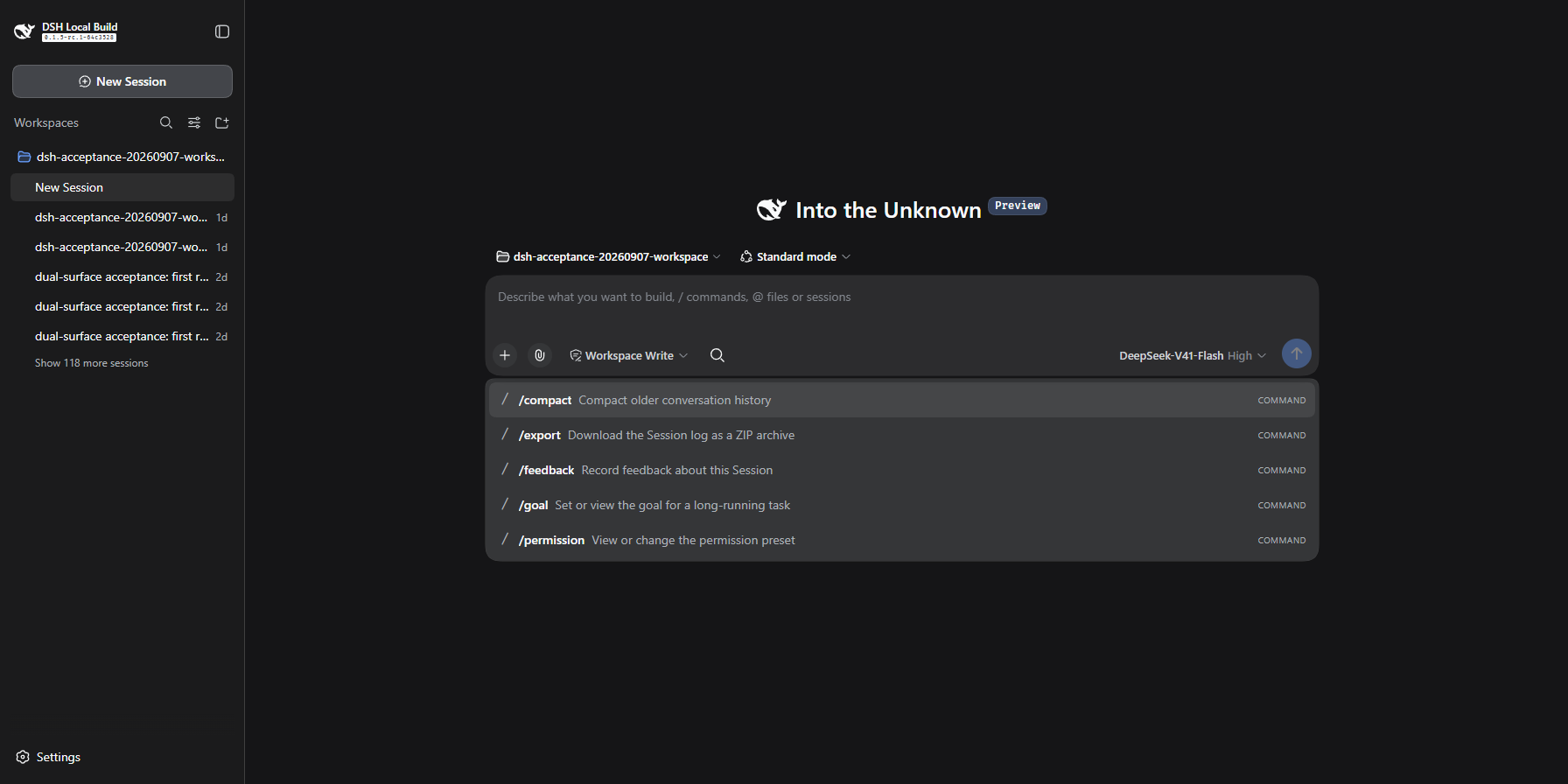  ### Global Floating Palette — global / navigational The global shortcut always opens the Floating Palette. Zero-turn uses the compact 540px presentation; active conversations use the full 600px presentation shown at the top of this page. 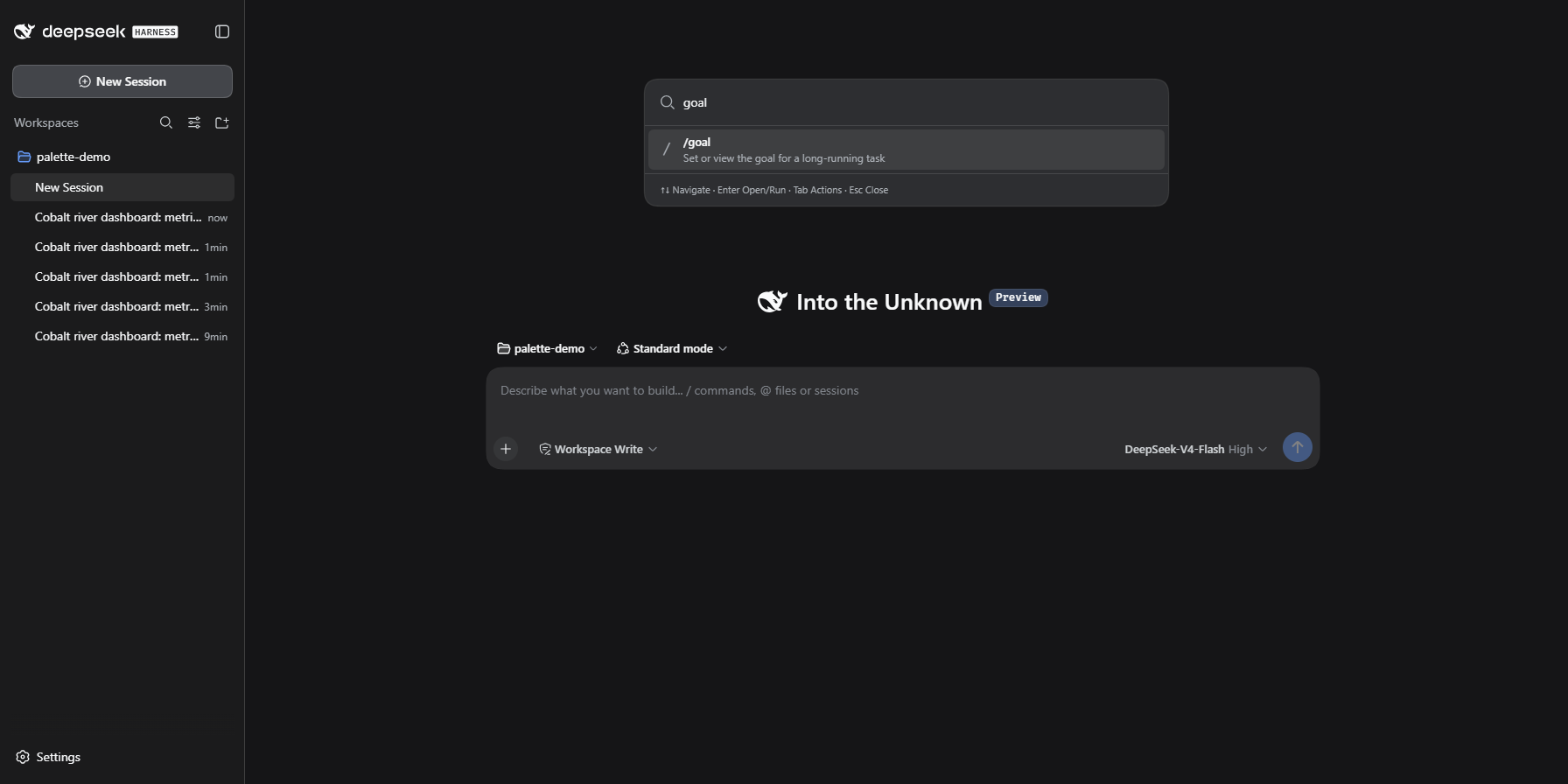 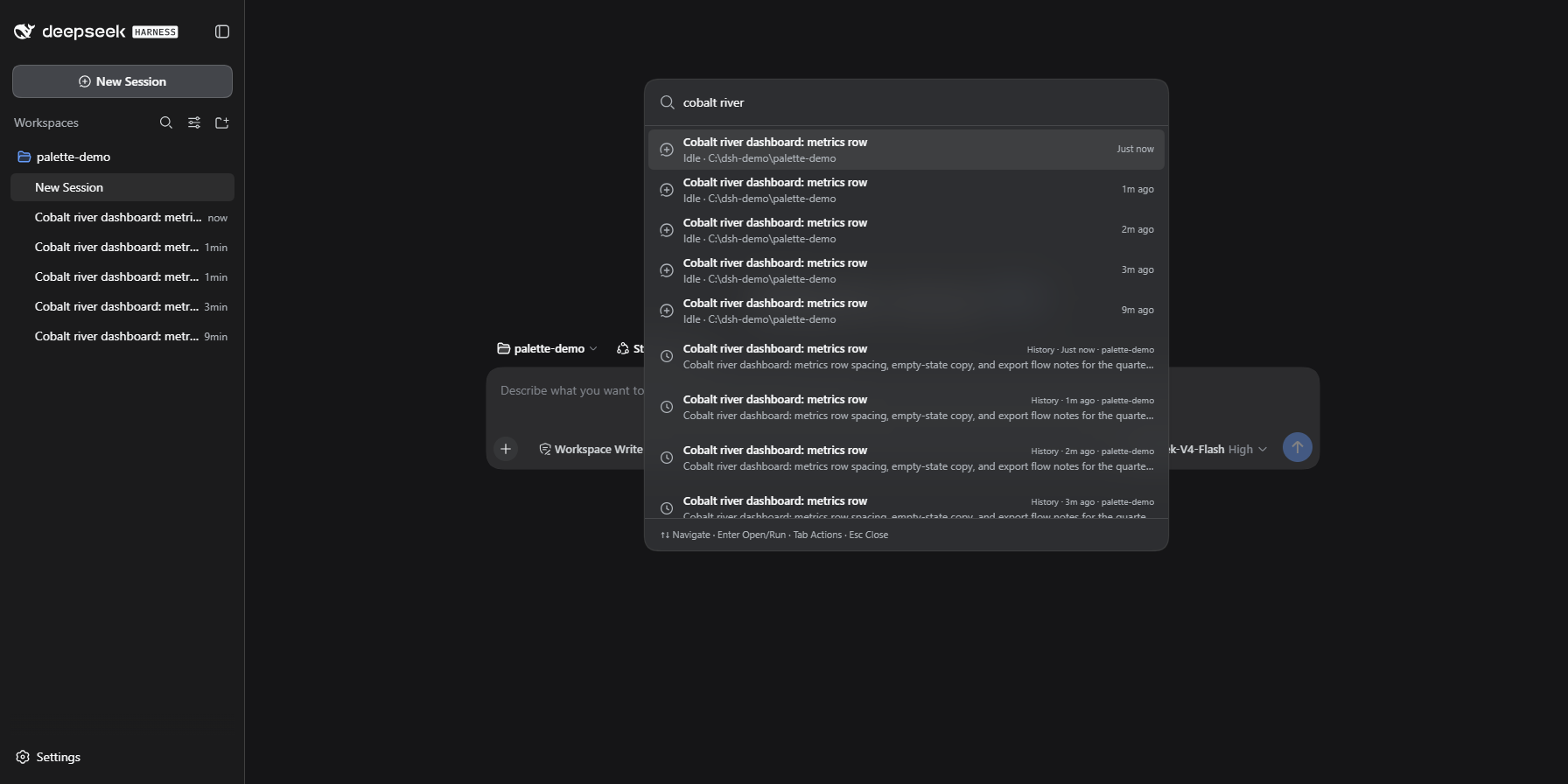 ## Search surfaces | Surface | Source contract | Action | Needs active session | |---|---|---|---| | Commands | `ctx.remote.commands.list / execute` (official Host catalog) | Execute | Yes | | Models | `ctx.modelDirectories` (official model directory) | Select | Yes | | Sessions | `ctx.sessions` (official session controller) | Open | No | | Conversation Hits | `ctx.sessions.search` (official FTS boundary) | Open | No | ## Community interoperability Interoperability is verified against real installed plugins — see the [interoperability matrix](docs/INTEROPERABILITY_MATRIX.md). - **Host command federation: automatic.** Host commands from community plugins (e.g. dsh-tui-command-ext's `/clear` `/rename` `/unarchive` `/compact-fast`, or a `/code-review` plugin) appear and execute with zero adaptation — the Palette reads the live official catalog. 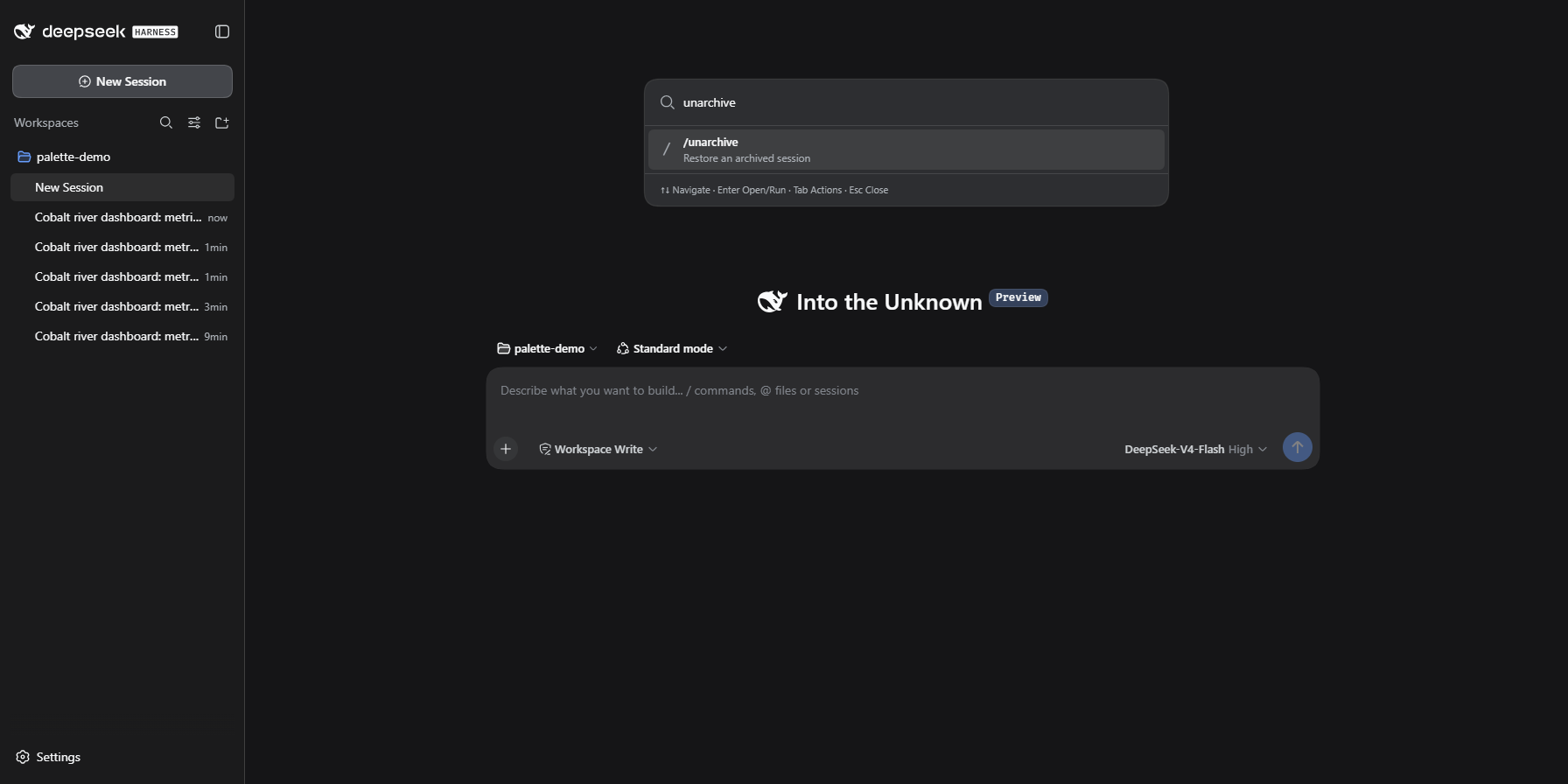 - **dsh-keys-palette: optional public bridge.** Registers one `universal-palette.open` action on its public `keys.actions` registry so you can bind a shortcut to open the Palette. Absent plugin, zero effect. - **Tested coexistence:** dsh-tui-command-ext, dsh-session-workbench, dsh-reference-anything, dsh-keys-palette, dsh-market — all verified installed together on real DSH boots. - **No private coupling.** Session Workbench and Reference Anything publish no public handoff API; the Palette integrates nothing beyond coexistence and documents upstream gaps instead of hacking around them. This is not "supports all plugins" — only the contracts above are consumed, capability-detected, with zero behavior change when absent. ## For plugin authors Universal Palette federates DSH's public contracts — you do not integrate with the Palette to become visible in it. - **Host commands**: register through DSH's official Host command contract (`ctx.commands.register`) and the Palette discovers you automatically from the live catalog on every query. No Palette dependency, no adapter, no release coordination. - **Deeper interoperability**: an optional, capability-detected adapter is considered only when your plugin exposes a stable public Cordis service. It must be zero-impact when your plugin is absent and lifecycle-safe when it unloads. The working example is dsh-keys-palette's public `keys.actions` registry, which the Palette uses to contribute one bindable "open" action. - **Client-only `commandUi` commands, private registries, DOM state, and internal routes are off the table** — the Palette keeps plain coexistence there and waits for a public API ([upstream gaps](docs/UPSTREAM_INTEROP_GAPS.md)). - **Session / reference / workspace plugins**: the same rule applies. A public handoff service or official contract is the only path into Palette secondary integrations; no public seam means `WAIT_PUBLIC_API`. Universal Palette currently has no Provider SDK, and none is planned. The preferred ecosystem path is: **register with DSH, and the Palette federates public contracts.** Details and verified cases: [interoperability matrix](docs/INTEROPERABILITY_MATRIX.md). ## Compatibility Verified against: - `@deepseek-ai/dsh@0.1.2-rc.1` (baseline, `deepseek-ai/deepseek-harness@76fda729799fe9b3848dbe2c211d4b231032b81e`) - `@deepseek-ai/dsh@0.1.5-rc.1` (API drift verified; compatible seams only) Other DSH revisions are unverified. Details: [COMPATIBILITY.md](docs/COMPATIBILITY.md), [COMMAND_COMPATIBILITY.md](docs/COMMAND_COMPATIBILITY.md). ### 0.1.5-rc.1 API drift (does not affect Universal Palette) The Palette consumes only the following public Client seams; these are **compatible** between 0.1.2-rc.1 and 0.1.5-rc.1: - `ctx.remote.commands.list` — unchanged array shape - `ctx.sessions.list / binding / search / open` — unchanged shapes - `ctx.workspaces.list / create` — unchanged - `ctx.modelDirectories.directoryFor / load / select` — unchanged - `ctx.inputTriggers.registerSource / sessionOf / adjudicate` — envelope field renamed `images`→`attachments` (Palette does not submit images) - `ctx.slots.spec / subscribe / inject / register` — unchanged names for `shell.overlay`, `conversation.input.left`, `conversation.input.overlay`, `conversation.hero.composer.dock`, `conversation.composer.dock`, `sidebar.footer.action` - `locale`, `plugin lifecycle` — unchanged Breaking changes in 0.1.5 (e.g. `commands.execute` 3rd param `images`→`attachments`, session format V3, wire `seedLength`→`isSeeded`, history events restructure) do not intersect the Palette's call surface. ### Hero surface - Stock `0.1.2-rc.1` / `0.1.5-rc.1`: no `conversation.hero.composer.dock` → Composer Search **fails closed** (Search button disabled with reason; `/find` claimed but answers capability error; no upward fallback). - Enhanced Hero experience (downward Morph) requires a host that declares `conversation.hero.composer.dock`. The verified host is the maintainer's fork (`yunmin311/deepseek-harness`, branch `feat/hero-composer-dock` at SHA `321bf88d10e0176674226d02de59d3e0bd79579d`). This is **not upstream support**; the fork is maintained as the long-term enhanced host for the full Hero experience. ### Desktop - No official DeepSeek Desktop installer is published. The upstream repo contains Desktop packaging infrastructure (`apps/desktop` Electron shell + `apps/desktop-host`), but no installers are available on `https://download.deepseek.com/_/harness/desktop/stable/...` (404 at review time). - Community wrappers (Electron/Tauri/Wails shells bundling stock `dsh web`) exist but are **not in the verified matrix**. - `deepseekagent.io` / third-party sites are not official DeepSeek products. ## Privacy & Security - No telemetry and no analytics. - No network requests of its own: everything goes through DSH's in-process public Client APIs. - No credentials read or stored; the demo/acceptance profiles run credential-free by design. - User preferences (shortcut, frecency) live in browser `localStorage` under the Palette's own namespace. - History search delegates to DSH's session FTS; its database belongs to the DSH profile, not to this plugin. ## Testing - `pnpm run check` — typecheck + unit tests (including the Keys Palette bridge lifecycle). - `pnpm run build` — host ESM face + browser CJS bundle with a purity gate. - Real DSH acceptance on Windows: official command compatibility gate ([`scripts/command-compat.mjs`](scripts/command-compat.mjs)), multi-plugin coexistence probes ([`scripts/interop-probe.mjs`](scripts/interop-probe.mjs)), and recorded evidence under [`evidence/`](evidence/). ## Known limitations - Locked to DSH `0.1.2-rc.1`; other revisions are unverified. - Client-only `commandUi` commands (e.g. popup pickers) are not discoverable — DSH exposes no public enumeration yet ([upstream gaps](docs/UPSTREAM_INTEROP_GAPS.md)). ## Development ```powershell pnpm install pnpm run check pnpm run build ``` ## Documentation - [Architecture](docs/ARCHITECTURE.md) - [Compatibility](docs/COMPATIBILITY.md) - [Command compatibility](docs/COMMAND_COMPATIBILITY.md) - [Design contract](docs/DESIGN_CONTRACT.md) - [Interoperability matrix](docs/INTEROPERABILITY_MATRIX.md) - [Upstream interop gaps](docs/UPSTREAM_INTEROP_GAPS.md) - [Changelog](CHANGELOG.md) ## License [MIT](LICENSE)
数据来源:公开的 DeepSeek Harness 插件目录与各插件 GitHub 仓库。本站为独立第三方目录,与 DeepSeek、幻方(High-Flyer)及插件作者均无隶属或背书关系。

